
Customising Advanced Settings on the Unifrost F410SS Upright Freezer Controller
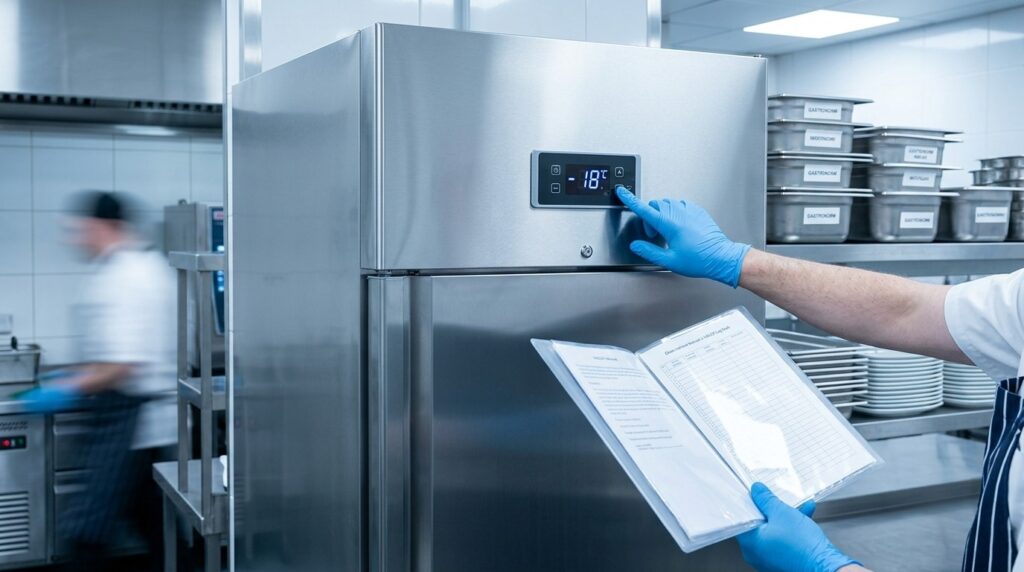
Learn to adjust the Unifrost F410SS freezer controller for Irish commercial use, balancing food safety and efficiency.
Unifrost F410SS Controller: Advanced Temperature Settings Customisation (Safe, HACCP-Aware)
You use the Unifrost F410SS upright freezer because it is a dependable single-door stainless unit with a live digital temperature readout, but your operation rarely matches factory assumptions. Door openings, loading patterns, and where the freezer sits in the kitchen all change how often it defrosts, how quickly it pulls down, and how often alarms trigger.
This guide shows you how to customise the F410SS controller’s advanced settings without compromising food safety or creating nuisance alarms that your team starts ignoring. You will learn what you can safely adjust as an operator versus what should stay in engineer-only menus, what to check before changing anything, and the practical tradeoffs behind common parameters like defrost schedule, alarm differentials, probe offset, and fan or compressor delays.
You will also see how to apply sensible profiles for different Irish use cases such as service-line freezing, hotel banqueting prep, and backup stock holding, plus a clear process for documenting changes for HACCP records and reverting back to recommended defaults if a setting change causes performance issues.
Why Customising Advanced Settings Matters
Advanced controller settings matter because your F410SS is rarely operating in tidy “factory default” conditions in Ireland. Between warm kitchens, busy service, short power blips and heavy door use, the wrong mix of alarms, defrost behaviour and probe correction can create temperature swings that only show up when you are under pressure.
There is also a straightforward compliance point. If you are storing quick-frozen food, Irish rules require temperature recordings to be dated and kept by the operator for at least one year (Irish Statute Book S.I. No. 370/1995). It is far easier to stand over those records if your alarm logic and controller behaviour match how the freezer is actually used.
More aggressive settings are not automatically safer. Tight alarms and poorly chosen defrost parameters can increase nuisance alarms, icing and recovery time. That can undermine both HACCP routines and day-to-day reliability.
Compliance: custom settings only help if you can defend them
If the F410SS forms part of your HACCP checks, the controller should support how you monitor and respond, not work against you. A freezer that alarms every time the door is opened for a banqueting pull, or after a brief power interruption, quickly trains staff to ignore alarms. That is when genuine high-temperature events get missed.
Aim for auditable stability:
A sensible frozen storage setpoint within the F410SS operating range (-10°C to -25°C)
Alarm delay and differential that tolerate normal door openings
Defrost behaviour that does not create repeated warm spikes
If you change anything beyond the setpoint, treat it as a controlled change. Note what you changed, when, and why. It stops future troubleshooting becoming guesswork, whether you are talking to an engineer or answering questions during an inspection.
Performance: the same F410SS behaves differently on the line vs in backup storage
An F410SS used as a service-line freezer gets hammered: frequent door openings, warm loads and fast pick rates. The same cabinet used as backup storage (longer door-closed periods, steadier loading) can run with calmer alarm behaviour and fewer interventions because the workload is simply different.
Advanced settings earn their keep when they match the controller’s “decisions” to your day-to-day reality, for example:
Hotel banqueting: short, intense access windows and high turnover, so nuisance alarms during pull-and-plate periods are a real risk.
Café or takeaway: lots of small door openings, plus a higher chance of blocked airflow from overfilled baskets, so alarm delays need to reflect actual door patterns.
Pub or rural venue backup: long door-closed time, where steady holding temperature matters and you want early warning if the unit struggles overnight.
This matters even more with static cooling, where loading pattern and airflow discipline have a bigger impact on recovery.
Risk management: the wrong “advanced” changes can look like a refrigeration fault
The biggest operational risk is changing engineer-level parameters to chase a symptom, then creating a new problem. A probe offset set incorrectly can make the display look compliant while product temperature drifts. Defrost timings pushed the wrong way can lead to icing, reduced airflow and longer pull-down times. That often shows up as persistent high-temperature alarms, flashing temperatures or repeated “dEF” cycles, even though the controller is doing exactly what it was told.
In practice, it helps to separate:
Owner-level changes: setpoint, acknowledging alarms, controller lock/unlock
Engineer-level tuning: defrost settings, probe calibration, alarm differentials
Once you understand what each control actually does on the F410SS controller, you can customise settings safely and predictably, rather than “setpoint chasing” every time the kitchen gets hot or service gets chaotic.
Understanding Key Controller Features and Settings
The Unifrost F410SS temperature controller is the built-in digital control that shows the cabinet temperature and manages cooling, alarms and defrost. In day-to-day use, you rely on it to set the operating temperature (within the unit’s stated -10°C to -25°C range), spot abnormal behaviour early, and keep performance steady under kitchen pressure.
One practical point: the controller is showing you what the probe is reading, not necessarily the warmest pack in the cabinet. Heavy loading, frequent door openings and blocked airflow can all make the display look “off” even when the freezer is basically doing its job.
Temperature range, setpoint and what “good” looks like in Irish HACCP kitchens
In Irish kitchens, you normally set a working freezer so stock stays reliably frozen during service, with enough headroom for door openings and deliveries. Many sites aim to keep frozen food at or below -18°C. The Food Safety Authority of Ireland notes that frozen food can continue to be kept frozen “as long as the temperature is still below -18ºC” in an incident check scenario such as a power cut (FSAI guidance).
If the cabinet is under pressure, it is tempting to keep pushing the setpoint colder. That is not always the best first move. You often get better results by tightening the basics:
Avoid overfilling and keep airflow paths clear
Keep product off the back wall
Minimise “door standing open” during busy periods
Let bulk deliveries pull down properly rather than repeatedly topping up warm stock
The controller can only report what it sees. Good loading and airflow make the reading more meaningful and the cabinet more stable.
Alarms and flashing display: what they mean operationally
A high-temperature alarm or a flashing display is the controller telling you the cabinet has been above an alarm threshold long enough to need attention. In real kitchens, the common causes are usually straightforward:
Door not fully seated
Warm deliveries loaded too quickly
Shelves packed in a way that blocks circulation
Poor ventilation around the cabinet (tight corner, boxed-in install)
Treat an alarm as a prompt to check stock risk and root cause, not just something to silence. If temperatures are climbing mid-service, reduce door openings and, where possible, move higher-risk items into your most stable long-term frozen storage until the cabinet recovers.
Defrost cycles and “dEF” on the controller
On commercial freezer controllers, “dEF” normally indicates a defrost phase. That is a normal part of operation, not a fault by itself. Defrost matters because ice build-up reduces performance, increases run time, and can trigger nuisance alarms even when the refrigeration system is fine.
What to watch for is unusually long defrost periods, or defrosts happening too often. That typically points to operational causes such as:
Door left ajar
Moisture being introduced (warm, uncovered food going in)
Usage patterns that no longer match the controller’s defrost settings
If you are seeing repeated defrost behaviour alongside warming stock, resist the urge to keep changing the setpoint. Start with the basics: door seal, loading, airflow, and whether the freezer is being asked to handle volumes or practices better suited to a different format or higher-capacity unit.
What you can safely change day-to-day versus what to leave alone
For most operators, the controller is a day-to-day monitoring and setpoint tool. Anything in engineer menus should be treated as controlled changes, with a clear reason and a note for HACCP records and any support handover.
Day-to-day actions: adjust the setpoint within the normal operating range, acknowledge or silence an alarm after checks, and lock or unlock the keypad (common after cleaning or a power cut).
Settings to approach cautiously: alarm delays and differentials, probe offsets, defrost intervals and duration, and any parameters that change how the system protects itself.
If you genuinely need to tailor behaviour for a specific use case (high-volume banqueting pulls, a hot install location, unusual service patterns), do it with a clear understanding of what each parameter changes and what “bad settings” look like in real symptoms. Avoid experimenting on a stocked cabinet during trading hours.
Common Mistakes and Misunderstandings
On most commercial controllers, “engineer” parameters affect how the freezer behaves under real load, not just what number shows on the display. Changing them on an F410SS can lead to temperature instability, nuisance alarms, or slower recovery after door openings even if the setpoint still looks fine.
That becomes a trading issue quickly. Irish food businesses are expected to keep frozen food at -18°C or colder, and to monitor and record temperatures as part of HACCP. If the cabinet starts drifting or alarming after someone has “tweaked” settings, it becomes a compliance and wastage problem, not just a nuisance (see the FSAI temperature control guidance: https://www.fsai.ie/business-advice/running-a-food-business/caterers/temperature-control). These problems often show up during the first busy service, when door traffic and warm loads test the unit properly.
Defrost settings: mistaking “dEF” for a fault, or “fixing” it by shortening defrost
Seeing a defrost indication is normal. The mistake is reacting by shortening defrost time or stretching intervals too far.
Too little defrost can let ice build up on the evaporator, reducing heat transfer and airflow. The freezer then runs longer, pulls down slower, and is more likely to throw high-temperature alarms.
Too much defrost (too frequent or too long) can create repeated warm swings. You might only notice it when product at the edges softens or you see more variation on your temperature records.
Either way, you make it harder to demonstrate consistent frozen storage at -18°C or colder in your HACCP system (FSAI temperature control guidance: https://www.fsai.ie/business-advice/running-a-food-business/caterers/temperature-control).
Probe offset and alarm differentials: “calibrating” the display instead of fixing the cause
Probe offset is often misused to make the display look “right” instead of dealing with the underlying issue. It can mask problems such as poor ventilation, overloading, or a dirty condenser.
From a HACCP point of view, that is backwards. You are expected to check and record temperatures using proper verification, not rely on controller cosmetics (FSAI temperature checking and records guidance: https://www.fsai.ie/business-advice/running-a-food-business/caterers/temperature-control).
A common bad combination is:
Offset set incorrectly (so the display flatters the situation), plus
Tight alarm differentials (so you get a burst of alarms once conditions shift).
That leads to false confidence when product is warming, followed by noisy alarms when the kitchen is already under pressure.
Setpoint chasing: driving the setpoint lower to compensate for doors, hot loads, or tight installation
Dropping the setpoint to “force” recovery usually increases compressor run time and can make swings around defrost more pronounced. It does not fix the real sources of heat gain, such as:
frequent door openings,
loading warm product,
poor clearance or a tight installation that restricts airflow.
The operational result is often more alarms, more icing, and more staff interference with settings. That creates awkward gaps in your food safety records if you are asked what changed and why, under HACCP expectations (FSAI HACCP principles: https://www.fsai.ie/business-advice/running-a-food-business/food-safety-management-system-(haccp)/principles-of-haccp).
If the cabinet is tight to a wall or boxed in, setpoint chasing can hide an installation issue until the first warm week exposes it.
“Locked controller” confusion after a power cut: staff changing settings without logging it
After a power cut or interruption, some controllers lock out changes (often shown by a padlock icon, depending on the controller). The common mistake is repeated button pressing until something changes, which can accidentally alter the setpoint or alarm thresholds without anyone noticing.
Even if the freezer stays safe, you lose traceability. Undocumented tweaks are hard to defend at audit or during an engineer handover, particularly when you are expected to keep temperature monitoring and records (FSAI guidance: https://www.fsai.ie/business-advice/running-a-food-business/caterers/temperature-control). In a busy kitchen, this often happens early in prep when several people use the same cabinet and nobody “owns” it.
These are good reasons to understand what each controller function actually does before changing anything beyond the normal setpoint and basic alarm settings.
Customising Settings for Different Irish Business Needs
Tailor the Unifrost F410SS controller for how you actually use the freezer day to day, without wandering into engineer-only parameters. Start with the basics you can defend in a HACCP check: setpoint, alarm thresholds and delays (where accessible), loading practice, cleaning, and installation. Then verify performance with a probe on product, not the cabinet display alone. If you cannot explain a setting change clearly, treat it as engineer-only.
1. Define the operating role before you touch settings
Controller behaviour is mostly about workflow, not theory.
Service-line freezer (busy café or pass area): frequent short door openings and warm air ingress. Your aim is steady recovery and alarms that still mean something.
Storage or backup freezer (pub or hotel store): longer closed-door periods. Priorities are stable holding temperature, manageable frost/ice build-up, and early warning if something goes wrong overnight.
Be realistic about “tight” settings. In a working Irish kitchen with repeated door openings, chasing a narrow alarm band often creates nuisance alarms rather than better control.
2. Set temperature and alarms to suit the venue type (keep it HACCP-friendly)
For Irish catering enforcement, the practical baseline is typically frozen food held at -18°C or colder. That aligns with FSAI temperature control guidance for caterers:
<https://www.fsai.ie/business-advice/running-a-food-business/caterers/temperature-control>
Hotel banqueting (high volume, planned access)
Treat it as organised storage with predictable loading.
Use a sensible holding setpoint (commonly around -18°C), and avoid overreacting to brief temperature rises during batch loading.
If your controller allows it, use an alarm delay that avoids triggering every time the door is opened for a trolley load, but still flags a failure to pull down after loading.
Operationally, you will get more stability from batch loading, leaving space for airflow around trays, and not packing product tight to the back wall.
Busy cafés (frequent access, small picks)
Here, “better settings” usually means fewer distractions for staff.
Keep the setpoint aligned with -18°C holding, and focus on reducing door-open time rather than pushing the cabinet colder.
A colder target can help recovery during rushes, but it also increases run time and can contribute to frosting when the door is constantly opened.
Practical wins: organise stock by station, keep product within the usable load line, and stop the “door open while deciding” habit.
Pubs (backup stock, low touches)
Make alarms meaningful, not noisy.
Set a high-temperature alarm strategy that gives you time to act before stock is at risk, especially if the unit sits in a warm back corridor or small cellar room in summer.
If you run two freezers, keep the tighter monitoring on the unit that would hurt trading first if it fails.
3. Defrost and airflow are “settings plus behaviour”, especially during warm spells
You may see defrost timing, fan behaviour, and alarm delays in the menus. Even if you do not change them, your day-to-day use changes the defrost workload.
Hotels and banqueting prep: loading unfrozen or only partially chilled items drives long pull-down times and nuisance alarms. Split loads into smaller batches and avoid blocking airflow between trays. Otherwise the cabinet air can look fine while product cores lag behind.
Cafés: before changing any parameters, check the basics: door seals, door discipline, and overloading. Static cooling needs clear circulation space to recover properly.
Pubs and bars: installation matters more than most people expect. A freezer wedged into a tight corner beside hot equipment will run longer and spend more time near alarm thresholds. Improving ventilation clearance and cleaning the condenser often reduces alarms without touching the controller.
4. Validate, document, and keep a clean rollback path
If you change a setpoint or alarm behaviour, record:
what you changed,
when you changed it,
why you changed it, and
what checks confirmed it was working.
That fits how HACCP is expected to work in practice, per FSAI HACCP guidance:
<https://www.fsai.ie/business-advice/running-a-food-business/food-safety-management-system-(haccp)/principles-of-haccp>
Do not validate using the display alone. Use a calibrated probe thermometer and log product checks as part of routine monitoring, as recommended in FSAI temperature control guidance:
<https://www.fsai.ie/business-advice/running-a-food-business/caterers/temperature-control>
Finally, keep a rollback path. Before entering any advanced menu, photograph the current settings you can access. If something gets changed accidentally after a power cut or a bit of button-mashing, you can restore known-good settings quickly and give your engineer clear information.
Safe Processes for Reverting to Default Settings
Start by deciding whether you only need to put the temperature setpoint back to your normal value, or whether you genuinely need a full controller reset. A full reset can change defrost and alarm behaviour, so it is not something to do “just in case”. Before you touch anything, record what is currently programmed. After any change, confirm the freezer pulls down and holds temperature in real kitchen conditions, then note the change for your HACCP records.
1. Agree what “default” means (factory vs. your HACCP baseline)
In a working kitchen there are usually two “defaults”:
Factory defaults: the settings the controller shipped with. These are not necessarily right for your stock levels, service pattern, or where the unit sits on site.
Site baseline: the last known-good settings your team can run reliably, check easily, and explain during an audit.
If the freezer is only off because someone changed the setpoint, you normally do not need to go near engineer parameters. If alarms are behaving oddly, defrost timing looks wrong, or the controller has become unstable after a power cut, slow down and follow a manual-led reset process.
2. Capture the settings and conditions before changing anything
Take two minutes to capture what you are starting from. It helps with fault-finding, handover to service support, and HACCP record-keeping. The FSAI’s HACCP guidance is clear that monitoring and records should suit your process, including temperature control checks (see the FSAI Principles of HACCP/principles-of-haccp)).
Photograph the controller display showing live temperature and any alarm code/icons.
Note the current setpoint and any alarm thresholds you can see in the user menu.
Write down what changed recently: power cut, heavy loading, doors being held open during prep, a warm kitchen, deep clean, or a recent service visit.
Check the basics that can look like “bad settings”: door closing and sealing properly, stock not jammed against the back wall, and no obvious airflow blockage inside the cabinet.
This avoids the common mistake of resetting the controller and losing the clues that would have explained the original problem.
3. Try an “operator-level” revert first (setpoint and keypad lock)
If you simply need to get back to your normal operating temperature, keep it at user level:
If a padlock/key icon is showing, unlock the keypad, then set the setpoint back to your usual target.
Avoid changing hidden parameters “to see what happens”. Small changes to defrost and alarm settings can create nuisance alarms or temperature swings that look like a refrigeration fault.
Once the setpoint is restored, leave the door closed and let the cabinet stabilise before judging performance. Do not keep lowering the setpoint every time staff see a brief warm spike during loading.
If the display and behaviour return to normal after this, you have effectively reverted to your operational default without adding risk.
4. If a full reset is needed, use the correct controller manual
A factory reset is controller-specific. Different controllers use different button sequences and reset parameters. Getting it wrong can disable alarms or change defrost behaviour in ways that only show up later during a busy shift.
Use the manual for the exact controller fitted to your unit, and follow the stated “reset” or “default parameters” steps exactly. If you cannot identify the controller type with confidence, treat that as a stop point. Stick to setpoint changes and get proper guidance before going deeper, because an incorrect engineer-level reset is an easy way to turn a manageable issue into downtime.
5. Validate the change with a pull-down check and a HACCP note
After any reset or revert, you are checking two things: the controller is reading correctly, and the freezer can achieve and hold temperature in your kitchen.
Let the cabinet run with the door closed and a realistic load pattern, and confirm it pulls down steadily without repeated alarms.
Where you use a calibrated probe as part of your routine, use it to confirm product-side temperatures, not just the air temperature on the display.
Log what you changed, when, and why, and record the stabilised operating temperature afterwards. It keeps your HACCP records tidy and makes any follow-up service call more efficient.
Once your baseline is stable again, you can make day-to-day adjustments with more confidence and less risk to stock.
Integrating Into a Wider Unifrost Management Strategy
What you do with controller settings should reflect how the freezer is used. An F410SS that’s opened all night on the service line needs a different approach to a back-of-house hold freezer that’s rarely touched.
In an Irish HACCP kitchen, treat any controller change as a controlled change. The FSAI guidance on HACCP-based food safety procedures is clear on identifying controls, monitoring them, and keeping records that show you stayed in control. Advanced settings can fix genuine operational headaches, but they can also create confusion if every cabinet behaves differently.
Keeping controller behaviour consistent across Unifrost uprights
If you have more than one Unifrost upright on site, consistency is usually the biggest win. You want the F410SS, an F620SV, and any other uprights to behave in a way staff can predict without thinking.
Focus on the settings that affect day-to-day decisions:
Your normal operating setpoint (and who is allowed to change it)
How you interpret a high-temperature alarm (what counts as a “watch it” vs “act now”)
What you do after a power cut or heavy loading (check, recover, record)
If you go beyond setpoint and simple alarms, keep the same logic across the upright freezer fleet unless there’s a clear operational reason not to. “Every cabinet has its own personality” sounds harmless until you’re trying to troubleshoot during service.
Use-case profiles: service-line freezer vs back-up stock freezer
Set the profile to match reality, not what looks tidy on the display.
A service-line F410SS in a café, pub kitchen, or pass area will see frequent door openings. In practice, you’re usually better off reducing nuisance alarms through sensible alarm thresholds and decent loading discipline, rather than chasing a colder setpoint. Pushing the setpoint down to compensate for constant opening can mean longer run time and a higher risk of icing, without solving the real issue.
A back-up or bulk-stock freezer is about protection and early warning. If the point of the cabinet is stable storage, you want alarms that flag a drift early, because stock loss is the real cost.
Day/night profiles can sound attractive, but not every commercial controller supports scheduled setpoints. Where scheduling is not available, you will get more value from operations: keep doors shut overnight, avoid loading warm stock late in the shift, and make sure airflow and condenser hygiene are doing their job.
Documenting changes so HACCP and support calls stay clean
“Mystery settings” are a reliable way to waste time in a busy kitchen. If you customise anything beyond the normal setpoint, write it down in a way that makes sense to an auditor and to the next engineer on site.
Record before and after values, the date, who changed it, and the business reason (for example: reduce nuisance alarms during banqueting load-in, or align alarm behaviour across all uprights).
Note what you expect to see afterwards, so staff know what “normal” looks like (for example: fewer alarm events during service, or different defrost behaviour on the display).
Keep the relevant manual or controller guide with your HACCP paperwork, so you are not relying on memory during a fault.
This is not paperwork for the sake of it. Clear records help you separate a genuine fault from a settings or loading issue, and they prevent repeat call-outs where the first visit is spent undoing an undocumented tweak.
When to stop tweaking and manage the root cause
If you keep changing advanced parameters to “get through service”, it usually means the cabinet is being asked to compensate for a site problem.
Common causes in Irish kitchens are:
Tight installation with poor ventilation
Heavy warm loading
Blocked airflow inside the cabinet (over-stacked shelves, product pushed hard against air paths)
Dirty condensers
Door seals and closers taking a beating during busy shifts
A sensible approach is to adjust cautiously, then stabilise the basics around the freezer: loading patterns that leave air paths, shelf layout that supports airflow, and quick pre-service checks before you log a support call. Once those are in place, controller settings become easier to interpret and easier to keep consistent across your Unifrost kit.
FAQs: F410SS loading and advanced controller changes
What GN depths and pan combinations work best in an F410SS for pre-portioned banqueting items while maintaining airflow?
For pre-portioned banqueting, the safest approach in an F410SS (static cooling) is to prioritise air gaps and fast cold recovery over maximum pack density.
Best all-round GN depths: use shallow to mid-depth pans for plated portions, typically 65 mm to 100 mm. They freeze and recover faster and are less likely to block cold circulation.
Avoid deep “solid blocks” for service-line use: very deep pans (for example 150 mm to 200 mm) can slow pull-down and encourage uneven product temperatures if they are tightly packed.
Pan combinations that work well:
1/1 GN for sheeted or tray-style portions when you can leave side and rear clearance.
1/2 GN or 1/3 GN for portion control and faster access, keeping door-open times down.
Airflow rules that matter more than the exact GN mix:
Leave a small clearance at the back and sides of every shelf level so cold air can move.
Do not let pans touch the inner back wall or press against the door gasket.
Keep some vertical headspace above pans on each shelf, and avoid covering shelves with cardboard or film that seals surfaces.
If you are freezing from fresh (not just holding frozen), portion shallow, space pans initially, then consolidate once fully frozen.
How can I safely customise advanced controller parameters on a Unifrost F410SS?
Treat advanced parameters as a controlled change process, not a quick tweak.
Confirm you actually need parameters (not just the setpoint). If you are only trying to run colder or warmer within the unit’s operating range, change the set temperature in the user menu first.
Get the correct controller guide for your specific controller variant. F410SS units can be supplied with different digital controllers across production runs, and parameter names can differ.
Create a baseline before you touch anything:
Photograph every parameter screen you plan to change.
Note the current setpoint, alarm limits/differentials, defrost settings and probe offset.
Change one parameter at a time, in small steps. Then run the freezer through real operating conditions (busy door openings, loading, overnight) and observe for at least one full cycle.
Verify with an independent thermometer. Use a calibrated probe or logger to confirm the cabinet temperature trends match the controller readout before and after changes.
Only adjust “owner-level” items unless you have technical sign-off. As a rule, keep engineer-only items (sensor type, compressor protection timings, factory calibration) unchanged unless instructed by a qualified refrigeration engineer.
If you need a specific outcome (for example reducing nuisance alarms or adjusting defrost behaviour), write down the outcome first and then adjust the minimum set of parameters needed to achieve it.
What are the risks of incorrect parameter changes on a Unifrost F410SS controller?
Incorrect advanced settings can cause food-safety risk, product damage, and avoidable breakdowns. Common failure modes include:
Defrost schedule mis-set: too frequent or too long can push product temperatures up and trigger alarms; too infrequent can drive ice build-up that reduces usable space and cooling performance.
Alarm settings too tight: nuisance alarms during normal door openings lead to alarm fatigue, and teams start ignoring real events.
Probe offset or calibration changes: a wrong offset can make the display look compliant while the cabinet is actually warmer than expected.
Differentials/hysteresis set poorly: can cause short cycling (extra wear) or wide temperature swings (poorer holding quality).
Safety protections altered: changing compressor delays or protection timings can increase stress on components after power cuts or frequent door openings.
How Irish operators should document changes for HACCP and handovers (recommended minimum):
A change log entry for each adjustment: date and time, unit ID/location, parameter name, before value and after value, reason for change, and who authorised it.
A verification note: independent probe or logger check (what you measured, when, and the result), plus any corrective action taken.
A rollback plan: where the baseline photos/notes are stored, and who to call if the unit alarms, ices up, or fails to pull down after the change.
This level of documentation protects you in audits and makes engineer support much faster if the freezer behaviour changes later.
Next step: compare frozen storage options
If you are deciding whether an F410SS-style single-door upright is the right fit for your kitchen, it helps to compare it against other commercial freezers by format and storage style.
Browse Caterboss’s Frozen Storage category to compare upright freezers, chest freezers, and other frozen storage options before you commit.
Related Unifrost guides
Compare models, maintenance advice and support information related to this topic.
Unifrost F410SS vs F620SV: Service Line vs Backup Storage Planning for Irish Kitchens
Explore Unifrost F410SS vs F620SV for service line and backup storage in Irish kitchens. Practical, informed guidance for smart freezer choices.
Read guide
Unifrost Upright Freezer Temperature Controller: Energy Optimisation for Irish Kitchens
Learn to optimise Unifrost upright freezer temp settings for energy efficiency and HACCP compliance in Irish kitchens.
Read guide
Customising Advanced Settings on Unifrost Upright Freezer Controllers for Irish Kitchens
Guide to customising Unifrost upright freezer controllers for optimal Irish kitchen use, covering temperature settings and advanced configurations.
Read guideCompare Unifrost freezer options on Caterboss
For current product options, pricing and availability, continue to Caterboss.