Troubleshooting
Problem-led guidance that helps operators check temperatures, airflow, icing, noise, and setup issues before escalating a service call.
Choose the symptom that matches what you are seeing.
Start with the issue that best matches a warm cabinet, slow temperature recovery, an unusual display or a missing manual.
Prep supportCounter fridge, prep counter, or saladette warm in serviceCheck airflow, loading, top-well use and the fitted controller.
Freezer supportUpright freezer warm, icing, or startup issueFollow these checks when an upright freezer is warm, icing up or having startup problems.
Issue guideIce machine not making iceUse this guide when the problem is ice production rather than cabinet temperature.
Controller checks before you touch parameters
Powered cabinets often get misdiagnosed as parameter issues. Match the controller family first, then open the correct PDF before changing anything.
Dixell XR02CX help
Useful where XR02CX appears on the display fascia and the problem may be set-point or controller-led.
Controller help
Dixell XR03CX help
Use when XR03CX is fitted and you need a safe starting point before adjusting values.
Controller help
Dixell XR06CX help
Parameter-led help for XR06CX controls used across several Unifrost cabinet families.
Controller help
Elitech ECS-02CX help
For cabinets using Elitech ECS-02CX controls where the label and button layout must be matched first.
Controller help
Carel PJEZ help
For PJEZ-controlled cabinets where you need the manual before changing settings or interpreting the display.
First checks before you call support
These checks are deliberately practical. They help operators rule out the most common causes of “not cooling properly” before moving into a service call or replacement discussion.
- Power and reset checks: confirm the socket, isolator, plug, and breaker before assuming a refrigeration fault.
- Airflow and ventilation: make sure louvers, rear clearances, and condenser airflow are not blocked by packaging, stock, or tight fitment.
- Loading and heat load: avoid judging recovery performance straight after loading warm stock or during heavy service door openings.
- Cleaning and condenser condition: dirty condensers and neglected filters are common causes of poor pull-down and repeated alarms.
- Door condition and icing: inspect seals, hinges, and icing before changing set-points that will not solve the underlying issue.
- Alarm capture: note the exact code or controller message before turning the unit off or changing values.
If the issue becomes a purchase or replacement decision rather than a support issue, Caterboss remains the commercial destination.
Useful Unifrost guides
Browse the latest articles related to this topic.
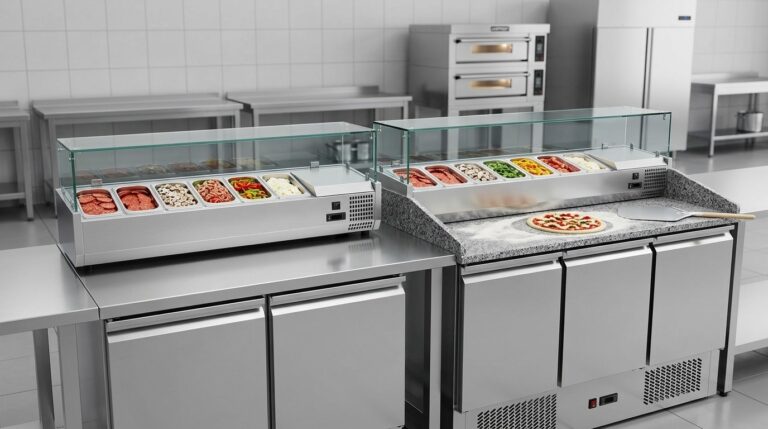
Unifrost Cold Topper vs SA136G Saladette Compact Pizza Line Buying Guide
Compare Unifrost cold toppers with SA136G saladettes for optimal pizza prep in Irish commercial kitchens.
Read guide FAQ
FAQ
How much chilled GN pan capacity do I need for a compact pizza line?
Start by mapping your busiest 60 to 90 minutes and the number of toppings you actually keep on the line.
Read guide
FAQ
Will a saladette keep toppings safe during busy service?
Yes, a commercial saladette is designed to keep toppings chilled in a refrigerated GN well, but busy service habits matter as much as the unit.
Read guideRequest Unifrost product help from Caterboss
Visit Caterboss for current Unifrost product options, pricing and availability.