
Troubleshooting Unifrost Commercial Fridge Controller Display Issues
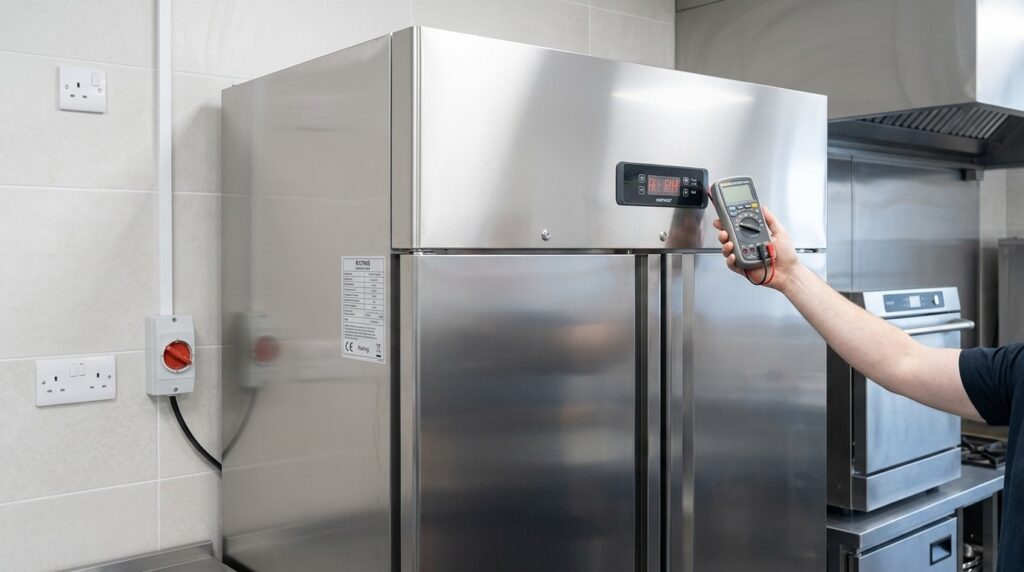
Resolve Unifrost fridge controller display issues safely with our troubleshooting guide. Ensure uninterrupted service in your Irish kitchen.
Unifrost Commercial Fridge Controller Display Troubleshooting: Flashing or Blank Screen
When your Unifrost commercial upright fridge controller is flashing, flickering, or going blank, you need to know fast whether you are looking at a normal alarm state, a power supply issue, or a genuine controller fault. On Unifrost models such as CR1800G, CR2230G, R1000SV and R1300SVN, the digital controller normally shows cabinet air temperature. A flashing reading or an alarm icon usually means an active warning, not normal operation.
This guide helps you make the right call without guesswork. You will work through the practical checks that often solve display problems in busy Irish kitchens, including power at the socket, plugs and extension leads, isolators and breakers, obvious cable damage, ventilation and loading, door sealing, and confirming basic controller settings. You will also see when to stop and escalate to an electrician or refrigeration engineer, and what details to capture from the rating plate and controller display so Unifrost support and Caterboss can match the correct manual and diagnose the issue quickly.
Common Causes of Display Issues
If a Unifrost commercial fridge controller flashes, flickers, or goes blank, it is often reacting to an unstable power supply or a poor connection at the plug, socket, isolator, or lead. That is more common than the controller “dying” outright.
The Irish HSA flags that extension leads and flexible cables are particularly prone to damage at plugs and sockets, and that socket outlets should not be overloaded with adaptors. Both can cause intermittent supply issues that show up as display faults on equipment like refrigeration controllers (HSA Electricity in the Workplace).
One practical point: on some Unifrost uprights (for example CR1800G, CR2230G, R1000SV and R1300SVN), a flashing temperature or an alarm icon may simply mean the unit is in an alarm state, not that the display has lost power. Separate “alarm behaviour” from an actual power or display fault before you start chasing wiring.
Power dips and loose connections (the most common “blank screen” story)
In busy Irish kitchens, the classic pattern is that the fridge continues to run, but the controller display resets, dims, or drops out for short spells. That usually points to a momentary voltage dip or a connection that is making and breaking under vibration, heat, or when other equipment starts up (dishwashers, glasswashers, combis, microwaves).
If the compressor and internal fans sound normal while the display misbehaves, treat it as a supply or connection issue first rather than a refrigeration system failure.
Extension leads, adaptors, and shared sockets under load
Upright fridges often end up plugged in wherever there is a spare socket, then share it with high-draw kit via an adaptor. Under load, that setup can create intermittent contact, local overheating at the plug top, or nuisance tripping, any of which can present as a controller display flickering or cutting out.
This is also where “it only happens during service” comes from. The fridge looks fine early morning, then starts acting up when equipment is being switched on and off constantly during a busy shift.
Isolator switches, breakers, and RCD trips that keep rebooting the controller
Many sites have a switched fused spur, wall isolator, or a plant-room isolator feeding the fridge socket. A tired switch, a slightly loose termination, or a protection device tripping and being reset can repeatedly reboot the controller, even if the fridge appears to recover quickly.
If you see resets after storms, maintenance work, or at the same time as other equipment cutting out, start with the site electrics. The controller is often the messenger, not the culprit.
Moisture, heat, and vibration at the fascia
A controller in the door or front fascia sits in the firing line: wet hands, cloths, spray drift from cleaning chemicals, steam from pot wash, and constant door slams. Condensation, moisture ingress, or a slightly loose connection behind the fascia can give you an unstable or blank display without meaning the refrigeration circuit has failed.
You will see this more where the fridge is tight to a dishwasher or wedged into an alcove with poor airflow, because heat and humidity run higher and components stay warm for longer.
Flashing display versus normal alarm behaviour on Unifrost uprights
On Unifrost uprights that normally display cabinet air temperature, a flashing temperature or alarm icon typically indicates an active warning condition rather than a display fault.
Before you assume the controller is failing, check the basics that commonly drive alarms in day-to-day trading: ventilation around the unit, loading practices (especially warm stock), door sealing, frequent openings during service, and controller settings. If you need to go further, match the correct manual to the exact model using the rating plate so you are troubleshooting the right alarm logic for that unit.
That distinction matters because an alarm can be caused by operating conditions in a hot kitchen, even with a perfectly stable power supply.
Preliminary Safety Checks
A flashing temperature, alarm icon, or a blank controller display usually points to a power or control issue, not automatically a “dead fridge”. Your first job is to check the supply safely, then confirm whether the cabinet is still cooling and whether stock is at risk. If you see heat, burning smells, moisture, damaged cabling, or repeat trips, stop and escalate.
1. Make it safe before you touch anything electrical
In a busy kitchen, it’s easy to rush this. Don’t.
Keep hands dry and clear any standing water.
Don’t reach behind units where you can’t see the cable route.
Don’t remove covers, controller fronts, or touch wiring.
Irish workplace electrical rules require electrical work to be carried out in a way that prevents danger, and equipment should be made dead where appropriate before work on live electrical equipment under S.I. No. 299/2007 (General Application Regulations) Part 3, Regulation 86.
2. Decide if this is a display issue or a refrigeration failure
A controller can flash or go blank while the refrigeration system still runs, especially after a brief power dip, a loose plug, or a nuisance trip. What matters is whether the cabinet is holding temperature.
Check, without dismantling anything:
Can you hear the compressor and/or fans running?
Is there airflow inside the cabinet (typically around the evaporator area)?
What do your probe checks and HACCP records say about product temperature?
If temperatures are rising or you can’t verify food safety with a probe and documented checks, treat it as a refrigeration failure and protect stock first.
3. Check the socket, plug, and how the unit is being fed
Start at the wall and work towards the unit.
Make sure the plug is fully seated and the socket isn’t loose.
Feel for an unusually warm plug top (don’t ignore this).
Look for scorch marks or signs of overheating.
If there’s a local isolator, ensure it’s fully on, not half-engaged.
If the unit is on an extension lead or multiway adaptor shared with high-load equipment (microwaves, kettles, dishwashers), that’s a common cause of intermittent display behaviour. If it can be done safely, move the fridge to a proper socket without stretching the cable or creating a trip hazard.
4. Check for a tripped breaker or RCD, and watch for repeat trips
If the socket appears dead, only check the distribution board if you’re authorised on-site and it’s part of your normal procedure.
If you reset a breaker or RCD and it trips again, stop. Repeated trips point to a fault or an overloaded circuit. Continually resetting it can make a small issue worse.
5. Inspect the visible cable run and the area around the back of the unit
With power off at the socket/isolator, check what you can see.
Look for:
Cable crushing behind the cabinet
Cuts in the outer sheath
Kinks at the plug strain relief
Heat damage
Also check for damp around the socket area, particularly where floors are washed down or where steam from a dishwasher is venting into a tight corner. Moisture plus heat is a reliable recipe for intermittent electrical issues.
6. Do a controlled power-cycle and watch what happens
If the supply looks sound and there are no red flags:
Switch the unit off at the socket or isolator.
Wait a full minute.
Switch back on and observe for 2 to 5 minutes.
If the display returns, note what it shows (temperature, alarm icon, flashing). If it comes back briefly and then goes blank when the compressor starts, that often points to a supply/connection problem under load. At that stage, it’s usually an electrician or refrigeration engineer job, not a parts-swapping exercise.
7. Stop self-checks and escalate if any red flags show up
In a working kitchen, a simple rule holds: if it feels unsafe, it is unsafe. Stop and escalate if you notice:
Burning smell, buzzing, sparking, visible arcing, scorch marks, or heat at the plug/socket
Water ingress, wet sockets, or repeated RCD/breaker trips
Damaged cable, crushed plug top, or anything that would require removing covers to inspect
The cabinet isn’t holding temperature and you can’t verify food safety with probe checks and documented records
Once you’ve ruled out obvious supply issues and the unit can power consistently, the next step is interpreting what the controller is reporting and checking settings and alarms against the correct manual for your exact model (use the rating plate details to match it).
Recognising escalation points
If a Unifrost commercial fridge controller is flashing or the display is blank and you cannot quickly confirm the cabinet is holding temperature, treat it as an operational risk, not “just a screen issue”. Your display is your day-to-day temperature check. If it is gone, you need another reliable confirmation straight away.
FSAI guidance is clear that chilled food should be kept between 0°C and 5°C. If you cannot verify that, you are into potential food safety and stock-loss territory, and you should act accordingly (FSAI temperature control guidance).
The urgency increases sharply if the controller fault happens alongside power issues, burning smells, heat at the plug or isolator, or repeated trips. At that point, it is no longer a refrigeration “settings” job. It is an electrical safety and business continuity issue.
Escalate to an engineer or electrician when it moves beyond settings and siting
In a busy Irish kitchen, these are sensible hard escalation points:
You cannot confirm product temperature with a calibrated probe, or food is not consistently holding at safe chilled temperatures (use your HACCP limit and the FSAI 0°C to 5°C reference).
The display drops out, flickers, or resets, especially when other heavy loads are running (dishwasher, combi, extraction, coffee machine). That often points to a supply or site issue, not a simple controller setting.
The unit trips an RCD/MCB, blows fuses, or only runs when moved onto an extension lead or multiway adaptor. That suggests an overloaded circuit, a wiring fault, or an unsuitable supply.
There are signs of overheating or electrical damage at the socket, plug top, cable, or isolator, or any smell of burning plastic.
The cabinet appears to be running but alarms persist after the basics have been addressed (door seal, loading, ventilation clearance, condenser cleanliness). At that stage you need model-specific checks from the correct manual and, in many cases, a site visit.
Anyone is tempted to remove the controller fascia or access wiring with the unit powered. Electrical work can be restricted in Ireland and should be handled by a registered contractor where required (Safe Electric on restricted electrical works).
Once you are clear on your escalation threshold, you can do a few safe checks to either resolve the issue quickly or give your engineer the right information without guesswork.
Preventing Future Display Problems
Keep the fridge on a stable, dedicated power supply, then reduce the day-to-day triggers that cause nuisance alarms: poor ventilation, overloading, and doors not sealing. Back it up with a simple weekly routine. Check air paths, the plug and cable condition, and whether the controller reading makes sense against your HACCP temperature checks.
If the fault pattern tracks power events or busy service periods, treat it as a site power issue first. Only look at controller replacement once the supply and installation are proven sound.
1. Lock in a stable power supply (and stop “temporary” power becoming permanent)
Controller displays tend to flicker or go blank when the supply dips, when the unit is being switched off at an isolator, or when it’s sharing a heavily loaded socket during service.
In Irish kitchens, don’t run an upright fridge from multiway adaptors or extension leads as a long-term workaround. The HSA’s electrical safety guidance is clear on avoiding overloaded sockets and unsafe leads because poor connections and overloaded outlets cause intermittent faults that look like a “controller problem”, especially when other equipment cuts in.
<https://www.hsa.ie/eng/topics/electricity/>
If you need changes to sockets, isolators or breaker protection, or you suspect a damp or loose outlet, log the times it happens and pass that information to a qualified electrician. Kitchen staff should not be opening panels or doing live tests.
2. Make the cabinet easier to run, so the controller stops alarming
A lot of “controller alarms” are the controller doing its job. It’s telling you the cabinet cannot hold setpoint in real working conditions.
Make these habits standard on shift:
Keep ventilation paths clear. Don’t box the unit into a tight alcove and don’t stack cardboard against rear panels or grille areas.
Avoid warm loading unless it’s designed for it. Hot or warm food drives long runtimes, slow recovery and nuisance alarms.
Get the door closure right every time. Clean the gasket so it seals properly without needing a slam.
If the fridge sits beside a combi oven, glass washer, or under a low canopy that traps heat, expect more alarms and more “odd” controller behaviour. Sometimes giving it a bit more breathing space improves stability more than changing parts, but only move it if you can still clean behind it and keep safe access.
3. Standardise cleaning and checks that protect the electronics
Controllers are vulnerable to moisture and grease around the fascia. The aim is to clean properly without flooding the controls.
Wipe the controller surround with a lightly damp cloth rather than spraying cleaner directly. Keep strong degreasers away from button membranes and display windows. As part of weekly cleaning, look for early warning signs that often sit behind intermittent display issues:
plug top not seated firmly
cable pinched under a castor or along a sharp edge
plug or socket running unusually warm after service
If you move the fridge for cleaning, be consistent about restarting it. If it has been laid on its side, let it stand upright before powering up, then watch the first pull-down and make sure the display stays stable before refilling.
4. Make setpoint discipline part of HACCP, not a guessing game
Unplanned setpoint changes create repeat call-outs. Agree the setpoint, record it, and limit changes to whoever owns HACCP on site. Use the correct manual for your exact model and controller. Match by the rating plate rather than assuming all Unifrost uprights use the same controller.
Irish food businesses are expected to have food safety management procedures based on HACCP principles. FSAI guidance is the right reference point.
<https://www.fsai.ie/business-advice/food-safety-management/haccp>
In practice, that means you should document:
the normal operating temperature range you expect to see on the display
how often you check it
what you do when it drifts outside your limit
Those records also make fault-finding faster. They help you separate a genuine refrigeration performance issue from a power or display issue, which is usually where the first, practical checks pay off.
Accessing Unifrost Support Resources
A flashing controller and a blank or flickering display are usually two different problems, so the best “support resource” is the right manual for the exact unit on your floor. Irish food businesses also need to be able to show temperature control and corrective actions as part of food safety management, as set out in the FSAI guidance on HACCP-based controls. In practice:
Flashing temperature or an alarm icon often means the controller wants attention. It might still be something operational you can fix quickly.
Blank or flickering display more often points to power supply, connections, standby/lock settings, or a protection trip rather than a refrigeration failure.
Start with identification and basic checks before changing settings or calling for parts.
Identify the exact model and match the right manual (don’t guess)
Start with the rating plate, not the controller face. Unifrost uprights such as CR1800G, CR2230G, R1000SV and R1300SVN use digital controllers, but the controller type and parameters can vary by production batch, retrofit, or a replacement controller. A “same looking fridge” is not a safe match.
In a working kitchen, do this when the unit is quiet:
Open the door and find the rating plate (often on an internal wall, or near the compressor compartment access).
Record the model and serial details.
Use Unifrost.ie support resources to pull the manual/controller guide that matches that rating plate, not just the range name.
If you cannot find a perfect match, stop there. It’s better to go to support with good photos and details than to experiment with parameters mid-service.
Understand what the controller is telling you before you troubleshoot deeper
Most commercial controllers display cabinet air temperature. A flashing reading or an alarm icon usually means an active warning state, not “normal operation”.
Before you go deeper, use the manual to confirm:
what that controller classifies as an alarm
the alarm thresholds and any time delays
how alarms clear or reset
whether there is a standby mode, key lock, or display-off setting that can look like a fault
If the display is blank, the manual still matters because it tells you what normal power-on behaviour looks like. Beyond basic user settings, you want the model-matched guide so you don’t change controls that affect temperature performance and food safety.
What to send to Unifrost or Caterboss support for faster diagnosis
Intermittent blank or flashing controller issues are hard to diagnose without context, particularly where a fridge is sharing a circuit with other high-load equipment during service. Your goal is to make the fault clear and repeatable “on paper”.
Send:
A clear photo of the rating plate (model and serial readable), plus a wider photo showing where it is in the cabinet
A close-up photo of the controller showing any icons or flashing states, and a short video if it flickers or cuts out
An installation photo showing where the unit sits (tight alcove, beside dishwasher/oven, under a canopy) and the clearance behind/above
A simple timeline: when it happens (start-up, busy service, after cleaning, after a power cut), whether the compressor/fans still run, and whether it clears after unplugging and reconnecting
What else is on the same socket/circuit (extension leads, shared sockets, isolators), and whether there have been RCD trips or breaker resets
Your HACCP note of the incident and what you did, including any food moved to alternative cold storage if temperatures were in doubt
Once captured, this also becomes a useful in-house reference if the issue returns on another shift.
When manuals stop helping and you should escalate
Escalate to technical support if:
the cabinet temperature isn’t holding safe levels
alarms won’t clear after basic operational fixes
the controller is blank and you cannot confirm the unit is maintaining temperature
The working-kitchen rule is straightforward: if you can’t confidently verify temperature control, treat it as a food safety issue and protect stock first.
It also helps to separate what staff can safely check from what needs a qualified electrician or refrigeration engineer, particularly around sockets, isolators, breakers, and anything behind the controller fascia. A small amount of structured information upfront makes the next step faster and safer.
FAQs: Unifrost controller flashing or blank display
How do I identify the correct Unifrost fridge manual and controller guide for my model?
Use the rating plate on the cabinet to match the manual to the exact model and variant.
Find the rating plate (commonly inside the cabinet, behind the kick plate, or on a rear side panel).
Record the model code exactly as shown (for example CR1800G, CR2230G, R1000SV, R1300SVN) and any serial number.
Then download the matching documentation from Unifrost Manuals.
If you are unsure between similar model codes, take two photos: (1) the full rating plate and (2) a close up of the controller display and buttons. Those two images are usually enough to confirm the correct controller guide and alarm meanings.
What are the safe steps for checking power and wiring before assuming a controller fault?
These checks are safe for operators because they do not involve opening panels or touching internal wiring.
Confirm the wall socket is live: plug in a known working item (kettle, phone charger) and verify it powers up.
Check the plug top and lead condition: look for heat damage, looseness, crushed cable, or a bent plug pin. If you see damage, stop and isolate the unit.
Avoid shared adapters: plug the fridge directly into the wall (no multi block) and see if the display stabilises.
Check for site power issues: ask if there were recent power cuts, breaker trips, or RCD trips. Intermittent supply can leave controllers in an alarm state or with a blank display.
Power cycle correctly: switch the unit off at the socket, wait 2 to 5 minutes, then switch back on. Watch for the controller to reboot and resume showing cabinet temperature.
If the display stays blank but the cabinet is still cooling, or if breakers keep tripping, stop troubleshooting and escalate to an electrician or refrigeration engineer. Do not attempt live tests or remove the controller fascia unless you are qualified.
Could shared extension leads cause display issues on Unifrost fridge controllers?
Yes. Shared extension leads and multi plugs are a common cause of flickering, flashing readings, random beeps, or a blank controller display, even when the refrigeration system seems to run.
Typical causes in busy Irish kitchens include:
Voltage drop when other high load equipment starts (dishwasher, microwave, coffee machine).
Loose contacts in worn extensions causing brief interruptions.
Overloaded circuits leading to nuisance trips or brownouts.
Practical test: run the fridge for a shift plugged directly into a dedicated wall socket. If the controller display stabilises, keep it on a dedicated supply and replace the extension lead. If the issue persists even on a dedicated socket, use the exact model manual for alarm interpretation and escalate for further electrical checks.
Need a dependable replacement or an upgrade?
If your controller display is repeatedly flashing or going blank and you have ruled out basic supply issues, it can be a good moment to review whether the unit is still the right fit for your kitchen workflow and service load.
Browse single door commercial fridges on Caterboss to compare reliable options suitable for Irish sites, then shortlist by size, door type, and usage pattern before you buy.
Related Unifrost guides
Compare models, maintenance advice and support information related to this topic.
Unifrost Upright Freezer Temperature Controller: New Owner Core Overview Guide for Irish Kitchens
Learn to set up and manage Unifrost upright freezer controllers for Irish kitchens. Essential guide for safety and efficiency.
Read guide
New Owner Quick Checks for Unifrost Upright Freezer Temperature Controllers
Quick reference for setting and checking Unifrost upright freezer controllers in Irish hotel service lines.
Read guide
Carel PJEZ Controller Manual and Parameters for Unifrost Cabinets
Controller manual and support for Unifrost cabinets using the Carel PJEZ controller.
Read guideView Unifrost fridges at Caterboss
For current product options, pricing and availability, continue to Caterboss.