
Unifrost F410SS Upright Freezer Temperature Troubleshooting Guide
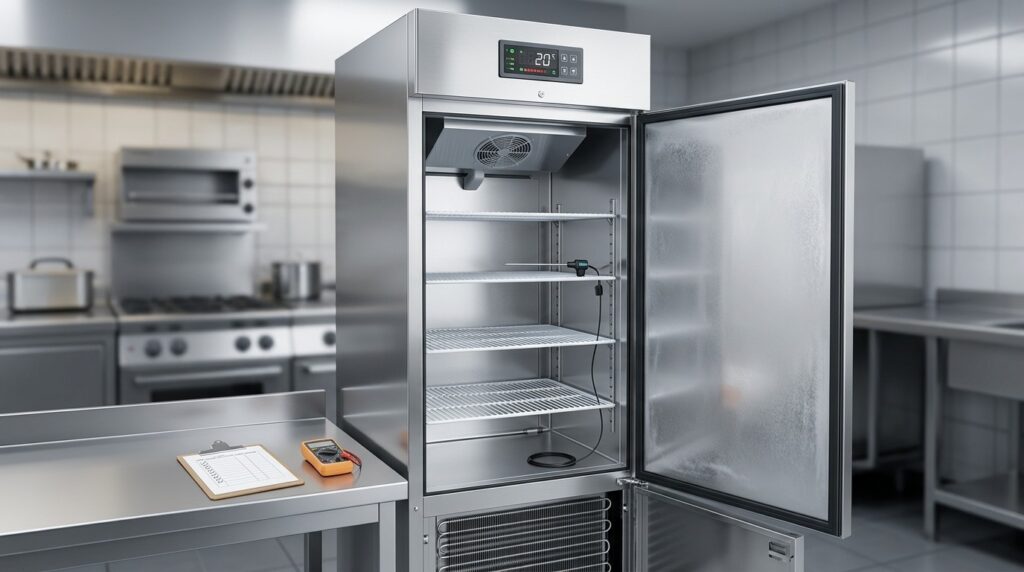
Troubleshoot your Unifrost F410SS freezer's temperature issues with our expert guide for Irish kitchens. Practical, step-by-step support.
Unifrost F410SS Upright Freezer Not Reaching Set Temperature: Troubleshooting Guide
If your Unifrost F410SS upright freezer (F410SS or F410SSOG) is struggling to pull down to its set point, you need to know whether it is an easy operator fix, a siting issue, or a fault that needs an engineer. Every hour you run warm risks stock loss, HACCP non compliance, and service disruption.
This guide walks you through the practical checks that typically resolve “too warm” complaints before you call for service, including loading and door use, airflow and ventilation, condenser cleanliness, ice build up, and how to sanity check the controller reading against a probe. You will also learn what the controller is telling you during defrost, how to tell normal behaviour from a real alarm, and what information to gather for Caterboss support so you get the fastest diagnosis and the right parts on the first visit.
What This Support Page Helps You Find
If your Unifrost F410SS upright freezer is not reaching its set temperature, this page helps you work out what you can fix on site versus what needs an engineer. The aim is to give you a quick, logical run-through that fits real Irish kitchen pressure.
It is also grounded in the reality that freezer temperatures are not just “nice to have” from a food safety and audit point of view. If you handle quick-frozen foods, temperature monitoring and records matter, including the requirement to keep recordings for at least one year under Ireland’s quick-frozen food temperature monitoring rules in S.I. No. 370/1995 (Regulation 7).
One important nuance: “not reaching set temperature” can be a true fault, but it can also be normal behaviour during defrost, heavy door openings, or straight after loading. A few checks first will save you time and unnecessary call-outs.
The most common reasons an F410SS runs warm (and what you can fix on site)
These are the issues that show up repeatedly in pubs, cafés, hotels, schools, and busy prep kitchens:
Door left ajar during service, or the door not closing cleanly because of stock fouling the seal
Damaged, crushed, or dirty door gaskets letting warm air in
Warm stock loaded too quickly, especially dense items that take time to pull down
Blocked internal airflow, for example product pushed hard against the back or vents covered
Poor ventilation around the unit, particularly in tight storerooms or hot back-of-house areas
Two common “quiet” causes that hit performance hard on upright freezers are:
A condenser clogged with grease and flour dust (reduces heat rejection, raises running temperatures)
An evaporator area iced up enough to restrict airflow (you lose circulation, so the cabinet sits warm)
A practical checklist when the cabinet sits around –5°C to –10°C instead of pulling down
When you are stuck in that mid-range, order matters. This page takes you through one workflow:
Low-risk basics: power supply, controller settings, door closure, loading practices
Air and ventilation: clearance around the cabinet, hot spots in the room, airflow through the unit
Cleanliness checks: condenser condition and signs of restricted airflow
Defrost and ice-up signs: whether the unit is mid-defrost or struggling to clear ice
Only then: suspicion of controller issues or a refrigeration fault that needs a call-out
It also flags practices that commonly make the problem worse, such as propping the door during stock-take or switching the freezer off overnight to “save electricity”. In most commercial kitchens, that just creates a long pull-down on restart, more temperature swing, and extra ice and moisture where you do not want it.
“dEF” on the controller, defrost cycles, and when it is actually a fault
It is normal for controllers on upright cabinets to show “dEF” during a defrost cycle. During defrost, cabinet air temperature can rise and recovery can take time, especially if the door is opened or the cabinet is heavily loaded.
This guide helps you separate:
Normal defrost behaviour (including fan behaviour and expected recovery)
from
A genuine fault condition that does not recover and needs attention
It also links to the relevant Unifrost controller guidance, so you do not have to rely on generic controller advice.
How to verify the displayed temperature against a calibrated probe (properly)
Displays can mislead if you do not check them the right way. Air temperature can look fine while product temperature lags behind, and the opposite can happen during recovery when return air is warmer.
This page shows a quick cross-check method using a calibrated probe in a HACCP-friendly way, so you can decide whether you are dealing with:
a measurement/display issue
an airflow or loading issue
a real cooling capacity problem
What to record for HACCP if the freezer has been above target for a period
If the freezer has been above your normal operating temperature, the priority is documenting what happened and what you did about it. This guide sets out what to log in a way that reflects how Irish kitchens are expected to run controls in practice:
times and readings
what stock was affected and any product checks
corrective actions taken
when you isolated product and when you escalated
What Caterboss support will ask for before booking a call-out
You can speed up triage by having the basics ready. This page lists what to note and photograph so support can diagnose faster, including:
model variant (F410SS or F410SSOG)
serial details
controller messages or alarms
recent loading and door-opening pattern
ambient conditions (hot storeroom, near dishwashers, etc.)
clear photos of the condenser area, door seal, and controller display
Siting and ventilation issues that matter in Irish back-of-house spaces
A lot of “can’t reach –18°C” complaints come down to placement. Upright freezers struggle when they are:
squeezed into a hot, unventilated storeroom
tight to walls with no airflow
placed beside cooking equipment
sitting in the path of a dishwasher heat plume
This guide explains what “good ventilation” looks like in day-to-day terms for an upright, and why warm Irish summer kitchens can expose a setup that is already marginal.
Owner-maintenance routine that prevents repeat problems
To reduce repeat warm-running issues, this page finishes with a simple monthly routine focused on what affects pull-down and holding temperature most:
condenser cleaning
gasket checks
hinge and door alignment checks
removing obvious internal airflow obstructions
keeping defrost drainage and internal surfaces clean enough to avoid ice-related airflow restriction
The fastest wins are usually the basic checks you can do immediately before you pick up the phone.
Basic Checks Before Calling an Engineer
If your Unifrost F410SS upright freezer is not getting to set temperature, start by proving there is a real temperature issue, then reduce the load you are putting on the cabinet (doors, warm stock, blocked airflow). After that, check the site basics that regularly stop uprights pulling down in Irish kitchens: ventilation and condenser cleanliness. Finally, look for defrost or ice-up behaviour that can temporarily lift the reading or choke airflow long-term.
If you are still sitting around –5°C to –10°C after good airflow, a clean condenser and normal door use, stop changing settings. Gather the right details for support so you protect stock and keep your HACCP records clean.
1. Confirm the problem with a calibrated probe (not just the display)
The controller usually shows cabinet air temperature, which reacts fast to door openings. To confirm whether product is actually at risk, check with a calibrated probe placed in a glycol bottle or between packs on the warmest shelf, then close the door and leave it to stabilise.
Display high, probe OK: you are often looking at service behaviour (door openings, loading pattern), not a refrigeration fault.
Display high, probe high: treat it as an active temperature control issue. Work through the checks below without chasing it by repeatedly changing the setpoint.
2. Check you are not catching a normal defrost cycle (and what “dEF” usually means)
If the display shows “dEF”, it typically indicates a defrost cycle is running. During defrost, it is normal for the displayed temperature to rise temporarily. Cooling should resume and the cabinet should pull back down once the cycle ends.
What matters is recovery. If you see “dEF” often, or the unit does not reliably pull back down afterwards, you are likely dealing with a defrost drain issue, excessive moisture load from doors, or ice building where it should not. At that point, you are troubleshooting an ice-up cause rather than “adjusting the temperature”.
3. Reduce door heat and moisture load during service (quick win in pubs, cafés and takeaways)
A busy upright freezer can look like it is “not reaching temperature” when it is simply losing ground to warm, moist air. This shows up more in summer, in small back-of-house rooms with poor extraction, and where the freezer sits beside a dishwasher or hot pass.
For one service, tighten the basics and watch recovery:
Keep door openings short.
Avoid standing with the door open during stock checks.
Do not leave the door ajar while portioning.
If pull-down improves, the root cause is day-to-day use rather than the sealed system.
4. Check loading and airflow inside the cabinet (warm spots are often self-inflicted)
Overpacking is a common reason a freezer stalls at –5°C to –10°C. If boxes are pressed to the back wall or stacked to block air movement, the evaporator cannot circulate cold air properly. You get warm pockets, slow pull-down and longer run times.
Quick test:
Pull product forward off the back wall.
Avoid stacking to the ceiling.
Keep air paths clear around the fan area.
If temperatures improve within a few hours, keep that loading pattern and adjust par levels or storage layout so the freezer is not being used like a storeroom shelf.
5. Check siting and ventilation around the freezer (hot kitchens punish poor airflow)
Upright freezers need to reject heat from the condenser. If the unit is boxed in, pushed tight to a wall, or installed beside heat-producing equipment, it can run continuously and still struggle to hit setpoint.
Reality check:
Is there clear space for air to move around the ventilation area?
Can the condenser be cleaned without dragging the freezer out mid-service?
If pulling the unit slightly forward improves pull-down, you have found a siting issue that will keep coming back until ventilation is sorted.
6. Inspect and clean the condenser area safely (classic cause of “won’t pull down”)
In flour-heavy prep areas, greasy extraction zones and tight stores, condenser fins clog quickly. When the condenser cannot shed heat, temperatures drift and running costs climb because the compressor works harder for less result.
If it is safe to do so:
Switch off at the isolator.
Access the condenser area.
Use a soft brush and vacuum to remove dust and debris.
Avoid bending fins, and avoid spraying water near electrics. If the unit pulls down properly after cleaning, make condenser checks part of a regular routine in that space.
7. Check the door seal and closing behaviour (small gaps cause big drift)
A split gasket, dirty seal, or a door that does not close properly will draw warm, moist air into the cabinet all day. That drives ice build-up and unstable temperatures, especially during busy prep.
Wipe the gasket clean and check for tears.
Confirm the door closes square and stays closed.
Check the cabinet is level. A slight twist can stop the door sealing properly.
Levelling is often a real temperature fix, not cosmetic tinkering.
8. Look for ice build-up and decide if a manual defrost is worth it
Ice where it should not be, especially if it restricts airflow, can stop an upright reaching temperature even when the compressor is running. Operator clues include weak airflow and problems that worsen after humid, door-heavy periods.
A manual defrost can be sensible if:
You can move stock to verified cold storage, and
You are confident ice build-up is choking airflow.
If you cannot hold food safely frozen during the defrost window, do not gamble. Escalate. Repeated ice-up can be driven by a failed component (fan, defrost system, probe) that a defrost will only mask for a day or two.
9. Manage HACCP records and stock decisions while you troubleshoot
If frozen food is at risk, treat it as an operational incident, not just a maintenance job. Decisions should be based on verified temperatures and time. The FSAI’s HACCP guidance is clear that when monitoring shows temperature control is not maintained, corrective action is required, which can include discarding affected food and repairing the unit as needed (FSAI Principles of HACCP, corrective action example/principles-of-haccp)).
In practice:
Log probe readings and where you measured.
Record what stock was moved or quarantined.
Note what actions you took to stabilise temperatures and when you escalated for service.
Follow your own HACCP plan for product-specific decisions.
10. Gather the right info for Unifrost support before you call (so the first response is useful)
If the freezer still will not reach set temperature after the checks above, stop changing settings. Collect what support needs to diagnose it remotely and reduce the chance of repeat visits. Use the rating plate model code and include the suffix, as variants can differ in setup and documentation.
Model and serial number from the rating plate (photo preferred)
Controller display photo showing current temperature and any message (including “dEF”) or alarm icon
Your probe reading and where you measured it (top shelf, warmest corner, between packs, etc.)
Installation details (tight store, hot line, beside dishwasher, poor ventilation)
What changed before the issue (warm delivery loaded, power cut, moved position, deep clean, doors left open during stock take)
If you need the correct downloads while you wait, use the Unifrost hub so you are working from the right document for the cabinet on your floor: Unifrost Upright Fridge Manuals & Installation Support.
Controller and Defrost Cycle Understanding
Seeing “dEF” on the controller means the freezer is in a defrost cycle. Cooling pauses briefly so the evaporator can clear frost and airflow can recover. On an upright freezer such as the Unifrost F410SS (F410SS / F410SSOG), that’s normal operation, even if the display looks warmer than your set point for a short period.
The key point: dEF on its own is not a fault code. What matters is what happens after defrost. If defrosts are unusually frequent, run long, or the cabinet struggles to pull temperature back down, you may be looking at an airflow or refrigeration issue rather than routine defrost.
How to tell a normal defrost from a real temperature problem
In a busy Irish kitchen, defrost can line up with door openings, deliveries, and warm stock going in. That can make the display look worse than the actual food temperature.
Use this as a quick check:
dEF showing, everything else normal: treat it as defrost in progress. Leave it alone and recheck once it’s had time to recover.
dEF showing often and recovery is slow: suspect conditions that build frost faster than the unit can clear it, such as:
doors held open during stock take or prep
damaged or dirty door gaskets
product blocking internal air paths (especially around the fan outlet/return)
a condenser that’s clogged with grease and dust, particularly in tight back-of-house spaces with poor ventilation
No dEF, but the cabinet stays warm: that usually points away from “normal defrost behaviour” and towards heat load, siting, airflow, controls, or a refrigeration fault.
Alarm or fault code (not dEF): treat it separately. Note exactly what the controller shows before anyone power-cycles the unit. That detail helps when you’re troubleshooting or booking service.
Why the temperature display can look “wrong” during defrost and heavy service
During defrost, the controller is balancing frost removal with cabinet stability. The probe measures air temperature where it sits, not the temperature in the middle of a stacked carton, so the display can lag or swing after repeated door openings.
If you’re making a food safety call, don’t rely on the display alone. Probe a product pack and follow your HACCP checks. For frozen storage, many operators work to around -18°C in line with common guidance (see the FSAI advice on frozen food storage temperatures: https://www.fsai.ie/business-advice/food-safety-and-hygiene/temperature-control).
Once you understand what dEF is, the practical test is simple: does the freezer recover promptly after defrost and service pressure? If not, start with the airflow, loading and ventilation checks above before assuming the controller is at fault.
Environmental Factors and Installation Impact
Site conditions are one of the most common reasons an upright freezer struggles to hit its set point. If ventilation is poor or the surrounding area is warm, the refrigeration system cannot reject heat efficiently. In practice, that can leave a cabinet hovering around –5°C to –10°C even though the controller is set colder.
That matters in a food business because the FSAI guidance is clear: freezers should be maintained at –18°C or colder. If the unit is installed in a warm area, you may need to set the temperature lower to achieve that in-use result, as outlined in the FSAI Temperature Control guidance.
How siting and ventilation limit pull-down
An upright freezer relies on airflow around its condenser to get heat out of the system. If warm air cannot move away, the unit ends up trying to cool itself with its own hot exhaust air. Common culprits include:
Boxed-in installs where the back or top has no breathing space
A tight storeroom with little or no air change
Heat sources nearby such as a combi oven, fryer line, glasswasher, or hot pipework
Stock, cartons, or shelving crowding the ventilation area
The typical “it fits there” placement can look fine on day one, then fail in real service. The compressor runs for longer, power use climbs, and recovery after door openings becomes slow because the condenser is working in a pocket of warm air.
Why warm kitchens and busy service show up as “not reaching temperature”
Higher ambient temperature increases the heat load before anyone opens the door. Then service behaviour does the rest: frequent openings, long “search time” with the door open, or loading in warm product will drag cabinet temperature up and slow pull-down.
From a HACCP point of view, “cold enough most of the time” is not a comfortable place to be. Your target is –18°C or colder, consistently. If your freezer is sited in a hot prep area or back bar, you are asking more of it than the same unit would face in a cooler store.
Installation checks worth doing before assuming a fault
Before blaming the controller or calling an engineer, check the basics that regularly cause temperature complaints:
Level and stability: a cabinet that is not sitting correctly can affect door alignment and sealing.
Door closure and gasket contact: the door should close cleanly and seal all the way around.
Airflow: make sure the ventilation area is not blocked by cartons, shelving, or a tight alcove.
Heat sources: move the unit away from cooking equipment and hot pipework where possible.
Use in that location: if it is effectively doing walk-in duty in a warm room with constant access, expect slower recovery.
If you improve airflow, reduce door-open time, and remove nearby heat, you will often see a noticeable improvement without touching settings. If the freezer still will not recover, then it makes sense to move on to safe on-unit checks and professional service diagnosis.
Manuals and Support Resources for Unifrost Models
Most “not reaching set temperature” call-outs are quicker to resolve when you’re working from the correct Unifrost manual and the right controller guidance, instead of guessing. Start with the Unifrost.ie controller support for uprights, because it reflects what you actually see on the display during service, including normal states like defrost.
One common trap is judging performance off the display alone. During defrost or after a heavy restock, the cabinet air reading can look “warm” for a period even when product is still within spec. Good troubleshooting separates normal controller behaviour from genuine cooling or airflow issues.
Where to find the right manual for F410SS and other Unifrost uprights
The F410SS sits within the Unifrost Upright Freezers family, and support files are usually grouped by cabinet family and variant (for example, F410SS / F410SSOG). Use Unifrost.ie first, as it’s curated for the models supplied and supported in Ireland and is the most likely place to find the relevant user guide, controller notes and downloads for your unit as supplied locally.
When you’re matching a document to the cabinet on site:
Use the data plate details (model and serial), not the marketing name.
Confirm the controller type, as the same cabinet family can appear with different controller layouts over time.
How to use the manual when the freezer is not reaching set temperature
A manual is most useful as a quick diagnostic reference. In practice you’re trying to establish three things:
Is the unit actually running as expected?
Is it moving air properly through the cabinet?
Can it reject heat into the room (ventilation and condenser condition)?
Use the manual alongside the Unifrost controller guidance. The manual explains what the unit is designed to do and what the controller messages mean. The guidance helps you assess real kitchen conditions that often cause complaints, such as frequent door openings, warm deliveries, or a freezer squeezed into a tight store with poor airflow.
“dEF” on the controller: what it means for troubleshooting
On Unifrost upright controllers, “dEF” is commonly a defrost cycle, not a fault. During defrost the cabinet air temperature can rise and fan behaviour may change, so it can look like the freezer is “not pulling down” even though it’s following its normal programme.
A practical check is simple: let the defrost finish, then judge recovery with the door kept shut. If “dEF” clears and the cabinet still won’t recover towards set temperature under normal loading and reasonable door discipline, you’re likely dealing with a real cooling, airflow or heat-rejection problem, not just controller behaviour.
Confirming controller temperature versus a probe reading (and why it matters for HACCP)
If you’re deciding whether food is safe, don’t rely on the controller display alone. The Food Safety Authority of Ireland advises using a calibrated probe thermometer for checking and monitoring food temperatures, recording measured temperatures as part of HACCP, and keeping probe accuracy to at least ±0.5°C. It also states freezers in food businesses should be maintained at -18°C or colder in its FSAI Temperature Control guidance.
If an F410SS is hovering around -5°C to -10°C:
Take a probe reading between packs (or core temperature where practical).
Note the probe reading and the controller display at the same time.
If the controller reads significantly colder than the probe, you may be looking at a sensing, placement or airflow issue. If both agree it’s warm, treat it as a genuine pull-down problem and use the manual’s checks to narrow the cause.
What to collect before you contact Caterboss or Unifrost support
Good information up front saves time and avoids repeat questions, especially when you can’t keep the door open in a busy kitchen. Gather the following in one go, then close the door and let the unit run:
Exact model (F410SS or F410SSOG) and serial number from the data plate
Set point, current displayed temperature, and any messages or alarms (including whether “dEF” is showing)
Recent loading history (fresh delivery, warm product, large restock)
Siting details (tight alcove, near oven/dishwasher, small unventilated store)
Clear photos of the controller display, door seal area, and condenser area (if accessible)
That gives support enough context to tell you whether user-side checks are likely to fix it (cleaning, airflow, loading and door discipline) or whether the symptoms point to an engineer visit.
Using manuals as a prevention tool, not just when something breaks
A lot of “won’t reach -18°C” issues start as gradual performance loss rather than a sudden failure. Keeping the manual and Unifrost troubleshooting guidance handy makes it easier to follow a simple routine:
Keep the condenser clean.
Keep door seals intact.
Don’t block internal airflow with overpacked shelves.
Learn what “normal” looks like after deliveries and during defrost.
That approach solves a large share of temperature complaints without tools or parts, and it suits Irish kitchens where ambient heat and ventilation can change quickly between seasons and service peaks.
Related Checks, Guides, and Troubleshooting Routes
The right troubleshooting route depends on whether you are seeing normal controller behaviour (often around defrost) or a genuine loss of cooling capacity. In Irish kitchens, the safe baseline is that freezers should be kept at -18°C or colder, and you should be checking with a calibrated probe and recording temperatures as part of your HACCP routine, as set out in the FSAI temperature control guidance for food businesses.
One important practical point: a cabinet can show a “warm” air reading during defrost or heavy door use without the product being out of spec. So match the guide to what you’re seeing on the controller, and what your probe checks are telling you.
If the controller is showing “dEF” or you suspect defrost is involved
If your F410SS (or F410SSOG) is running warmer than usual and you’re seeing “dEF/DEF”, avoid chasing the setpoint or repeatedly power-cycling the unit. Start by confirming whether it’s a scheduled defrost or a pattern that points to a fault. The useful test is recovery after defrost (how quickly it pulls back down), rather than reacting to the three letters on the display.
If you need the right manual or controller PDF before touching settings
On Unifrost uprights, the controller type matters as much as the cabinet model when you’re interpreting messages, alarms, and defrost behaviour. The lowest-risk move is to match the controller label on the fascia to the correct PDF. Only then decide whether you’re dealing with a settings issue, day-to-day use (door openings, loading, airflow), or a refrigeration fault.
Quick internal routes that keep you in the right lane
“dEF” vs real fault indicators on Unifrost upright freezer controllers: Understanding “dEF” vs Fault Indicators on Unifrost Upright Freezer Controllers
Manuals library (including controller manuals and parameter guides): Manuals & Downloads
Wider Unifrost support archive (icing, alarms, noisy running, door issues): Knowledge Hub
Quick definitions and “what does this mean?” checks: Unifrost FAQs
If ambient heat, ventilation, or siting is the real constraint
A lot of “won’t reach -18°C” complaints in Irish pubs, cafés, and school kitchens come down to where the upright is installed. Tight storerooms, restricted airflow around the cabinet, and hot back-of-house conditions in summer slow pull-down and make defrost recovery look worse on the display, even when the refrigeration system is basically sound.
If the issue tracks busy services, deliveries, or hot spells rather than being constant, treat siting and ventilation as part of the fault-finding, not an afterthought.
If you suspect the display temperature is misleading
Before calling the controller or thermostat “faulty”, confirm what’s being measured. The cabinet display typically reports an air probe, not the core temperature of food, so it will move quickly with door openings and during defrost.
For HACCP, your decision point is your calibrated probe check and the trend in your records, not a single glance at the controller mid-service.
With those routes in mind, you can work through the practical on-site checks that resolve most “not reaching set temperature” issues before an engineer is needed.
F410SS temperature troubleshooting FAQs
Why is my F410SS not getting down to set temperature?
On the F410SS, the most common non-fault reasons are heat load and airflow issues rather than a “broken thermostat”. Check these first:
Recent loading or warm product: a full load of unfrozen stock can keep the cabinet sitting around –5°C to –10°C for hours while it pulls down. Aim to load pre-frozen product where possible and avoid bulk-loading in one go.
Door and seal performance: damaged gaskets, doors not closing fully, or frequent openings cause constant warm air ingress and icing.
Airflow blocked inside: overpacking against the back wall or covering internal fan/air channels stops cold air circulation so the probe may never see true cabinet conditions.
Defrost cycle behaviour: if the controller shows dEF, that can be a normal defrost period. During/just after defrost, the displayed temperature may rise temporarily before recovery.
If the cabinet cannot recover even with light loading and a well-sealed door, treat it as a service issue (possible condenser blockage, fan problem, refrigerant circuit fault, or sensor/controller fault) and gather the pre-call info listed below.
What checks should I do for a too warm freezer?
Run these checks in order before calling an engineer. They solve a large share of “not reaching set point” calls:
Confirm the reading: place a calibrated probe in a glycol bottle or between packs for 15 to 30 minutes and compare to the controller display. Log both values.
Controller status: note any messages (including dEF) or alarm indicators. If it is defrosting, wait for the cycle to finish and then allow time for recovery.
Door seal and closure: inspect gaskets for splits, gaps, or debris. Check the door self-closes and is not being held ajar by shelving or product.
Loading and airflow: remove anything blocking internal air paths. Do not pack tightly against the rear/air outlets and avoid placing warm deliveries straight in.
Condenser and ventilation: ensure the condenser area is not dust-laden or blocked and that air can get in and out freely around the unit.
Ice build-up: heavy ice on internal panels/air outlets points to an airflow or defrost issue. If safe for your operation, plan a controlled full defrost (see your site SOP) rather than chipping ice.
If temperature still will not pull down after these steps, stop “trial-and-error” and move to support with the details below to speed up diagnosis.
How to handle HACCP if the F410SS temperature is too high?
Handle this as a food safety event first, then a refrigeration issue:
Start an incident record immediately: note date/time discovered, the highest observed temperature, and whether the controller showed alarms or dEF.
Verify with a calibrated probe: record independent product temperature (not just air temperature). If you can, check the warmest point in the load.
Protect product: keep the door closed as much as possible. If you have alternative frozen storage, move at-risk product quickly (minimise time out of temperature control during transfers).
Assess and segregate: identify any high-risk items (e.g., ready-to-eat, high value, allergen-sensitive batches). Quarantine anything you are unsure about until a responsible manager reviews.
Document corrective actions: what you did (reduced loading, moved stock, cleaned condenser, called support), and what you will do to prevent recurrence (maintenance schedule, loading SOP, siting improvements).
If the freezer has been above your site’s safe limits for an unknown period, escalate to your HACCP lead and follow your company discard policy. Support can help troubleshoot the equipment, but do not wait for an engineer before making food safety decisions.
Need help diagnosing an F410SS that won’t pull down?
If you have run through the checks above and the cabinet still will not reach temperature, it is usually faster to speak to a Unifrost expert with your readings, controller messages, and a few photos so the right next step is clear.
If you are also comparing options for your kitchen or replacing an older unit, browse the Upright Freezers Range to see the current Unifrost upright freezer lineup and find a model that suits your capacity and workflow.
Related Unifrost guides
Compare models, maintenance advice and support information related to this topic.
Unifrost F410SS Upright Freezer: Layout, Controller, and Energy Saving Hub
Optimize your Unifrost F410SS for layout, controller use, and energy efficiency in Irish kitchens.
Read guide
Optimising Unifrost F410SS Upright Freezer Temperature Controller Settings
Learn to adjust Unifrost F410SS freezer settings for optimal use in Ireland's hospitality sector. Improve efficiency and compliance.
Read guide
Unifrost Ice Storage Bin vs Upright Freezer: Best Choice for Irish Hospitality
Guide to choosing between Unifrost ice bins and upright freezers for ice storage in Irish hospitality. Understand efficiency and hygiene impacts.
Read guideCompare Unifrost freezer options on Caterboss
For current product options, pricing and availability, continue to Caterboss.