
Understanding Your Unifrost Commercial Fridge Controller: Power Cut Recovery and Alarm Management
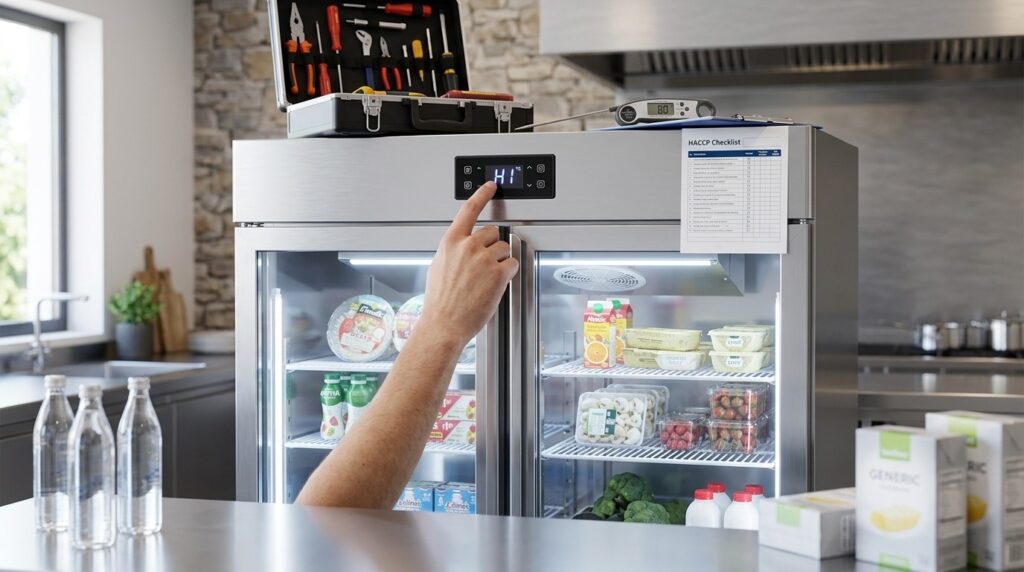
Learn to manage Unifrost fridge controller alarms post-power cut for smooth operations in Irish kitchens.
Unifrost Commercial Fridge Controller Alarms After a Power Cut: OFF, HI, LO and dEF Explained
When a power cut, door left open, or heavy restock hits your Unifrost upright fridge or freezer, the electronic controller can start showing OFF, HI, LO, dEF, or a flashing temperature. You need to know what is normal recovery, what puts stock and HACCP at risk, and what needs an engineer.
This page walks you through the practical checks you can do on site: what each message means, how to silence or clear an alarm once the cabinet is stable, and a step by step recovery checklist after an outage so you can make a confident keep or discard decision. It also flags the tradeoffs with changing advanced alarm settings, and when repeated alarms, locked buttons, or frequent defrost messages mean it is time to stop tweaking and contact support.
What this support page helps you find
After a power cut, it’s common for a Unifrost commercial fridge or freezer controller to show a flashing temperature and trigger a temporary HI alarm while the cabinet pulls back down to its setpoint. The key is not to treat the alarm as a food safety verdict on its own.
For HACCP decisions, rely on verified product temperature and time out of control, not the display message. As a practical benchmark for checks in Ireland, the FSAI notes that fridges and chill cabinets should run between 0°C and 5°C:
https://www.fsai.ie/consumer-advice/food-safety-and-hygiene/storage
This page helps you separate normal recovery behaviour from the situations where you need to act quickly. It also explains common controller messages so staff do not silence or reset the wrong thing under service pressure.
What you can use this hub for in a real Irish kitchen
In a café, pub kitchen, hotel prep area, takeaway, or canteen, you usually need an answer you can use in under a minute. This hub is written for that moment: the display is flashing, an alarm is sounding, the door has been opened repeatedly during service, or you are back in after an ESB outage and need to protect stock and your temperature records.
You will find plain-English explanations of the common messages seen on Unifrost upright fridges and freezers, plus what “normal” looks like during pull-down after a power cut, a heavy load-in, or a long door-open event.
What this page will not do (on purpose)
It will not tell you to change advanced controller parameters as a first step. In practice, that can mask a real temperature control issue and leave you with weaker HACCP evidence if anything is queried later.
Where settings may be adjustable, the guidance here starts with safer checks you can do on site:
confirm actual product temperature (not just air temperature)
check doors are fully closing and seals are intact
make sure shelves are not blocking airflow
confirm the unit has adequate ventilation and is not boxed in by stock or equipment
It also will not guess exact recovery times. Pull-down depends on how full the cabinet is, how much warm stock was loaded, how often the door is opened, and the ambient temperature in the room.
When you should stop treating HI/LO/dEF as “just a message”
A one-off HI after a power cut is often just recovery. Repeated alarms, alarms that return daily, or a cabinet that never settles back to normal operating temperature are different, and usually point to a site issue that needs attention.
This hub flags common causes in Irish hospitality settings, including frequent door opening during service, overloaded shelves restricting airflow, warm deliveries loaded straight in, poor ventilation around the unit, and missed routine cleaning and maintenance.
From here, it will make more sense to interpret the controller display itself, starting with the basics of what OFF, HI, LO and dEF typically mean on Unifrost commercial fridge and freezer controllers.
Understanding Unifrost Controller Messages: OFF, HI, LO, DEF
OFF, HI, LO and dEF are short status or alarm messages on the electronic controller. They tell you whether the cabinet is running, out of temperature, or in a defrost cycle. They matter because they affect food safety decisions during service and what you record in your HACCP checks.
One message can be normal in the right context. For example, HI after a power cut or a big warm delivery can clear on its own. HI that never clears is a different story. The safest approach is always the same: do a quick operational check first, then decide whether you need to escalate.
OFF: what it means in practice
OFF usually means the controller is in standby or the refrigeration output has been stopped. In a working kitchen, it often comes down to something simple: the socket switch has been turned off, an isolator has been used during clean-down, or someone has put the controller into standby without meaning to.
Immediate action
Check power at the plug, socket switch and isolator.
Confirm the controller is set to run (not standby).
Treat stock as “at risk” until you’ve verified product temperature with a probe.
If the cabinet has been off for any period, record it as a temperature control interruption in your HACCP notes and only return food to service once you’re back within your site limits.
HI: high-temperature alarm and recovery behaviour
HI (or a flashing temperature above normal) is a high-temperature alarm. The controller is telling you the cabinet air temperature has been above its alarm threshold for long enough to trigger an alert.
In Irish operations, common causes include an ESB outage, heavy door opening during service, or loading in warm stock after a delivery. A short-lived HI can be expected during pull-down, especially on uprights that have just been stocked.
Immediate action
Close the door and reduce openings. Don’t keep “checking it” every two minutes.
Stop loading product until the cabinet starts recovering.
Check the basics you can fix quickly:
Door not closing properly or gasket not sealing
Stock blocking internal airflow
Cabinet pushed too tight to a wall so it can’t breathe
Condenser area clogged with dust (if accessible for safe cleaning)
Probe-check the highest-risk items (typically the warmest product and anything near the door) and log the alarm and corrective action in HACCP.
For temperature targets and cold chain expectations, use FSAI guidance as your baseline: chilled food is typically held at 0 to 5°C and frozen food at -18°C or colder. Source: Food Safety Authority of Ireland advice on maintaining food temperatures.
LO: low-temperature alarm and product risk
LO is a low-temperature alarm. The cabinet air temperature is below the controller’s low limit. That can be as simple as a setpoint being changed, or it can point to a probe/controller issue.
On a fridge (not a freezer), LO can be costly. It can freeze chilled stock, split bottles, and ruin prepped items. It also creates waste and rework at the worst possible time.
Immediate action
Check the setpoint hasn’t been altered.
Probe items most likely to freeze:
Product against the back wall or near the evaporator
Anything low down where cold air can pool
Stabilise loading and airflow before changing settings.
If LO persists and product is freezing, escalate for service rather than “chasing it” by adjusting settings repeatedly.
dEF (DEF): defrost status, not a fault code
dEF indicates the unit is in a defrost cycle. That’s normal. Commercial cabinets defrost to manage ice build-up and moisture on the evaporator.
During defrost you may see the displayed temperature drift, and alarms can behave differently, because the controller is focused on finishing defrost and then bringing temperature back down.
Immediate action
Usually, do nothing. Keep the door closed and let the cycle complete.
If you see frequent dEF cycles alongside slow pull-down, water/ice build-up, or repeated HI alarms after defrost, treat it as a performance issue. Check door discipline, airflow and placement first, then arrange service if it continues.
On-the-spot actions staff can follow beside the cabinet
OFF: confirm power at socket/isolator, confirm the controller isn’t in standby, probe-check stock before returning it to service.
HI: close the door, stop loading, check airflow and seals, probe the warmest-risk items, log corrective action.
LO: check the setpoint, probe items likely to freeze, stabilise loading and airflow before adjusting settings.
dEF: keep the door shut and allow defrost to finish. If defrost is frequent with poor recovery, investigate airflow, loading and placement.
Knowing what the message means is useful. Having a consistent habit for checking, probing, and logging is what stops a simple alarm turning into spoiled stock or a missed HACCP record.
Handling Power Cut Recovery and High-Temperature Alarms
What’s the step-by-step recovery checklist for dealing with a high-temperature (HI or flashing temperature) alarm on a Unifrost commercial fridge/freezer after a power cut in an Irish kitchen?
Start by confirming the unit has stable power. Then keep the doors shut and let the cabinet pull back down while you verify product temperatures with a probe. Log what happened for HACCP, prioritise high-risk foods, and only silence the alarm once you’ve confirmed both cabinet and product are back under control. If it won’t recover in a reasonable time, or the alarm keeps returning, treat it as a fault to investigate rather than “the controller acting up”.
1. Confirm it’s actually powered and running (not just lit up)
After an ESB outage, a HI alarm is often just the cabinet warming during downtime. Before you judge performance, make sure power is genuinely back and stable.
Check, in order:
Wall isolator or plug is on
Display is on
You can hear or feel normal operation (fans running, compressor cycling)
No local issue: tripped breaker, switched-off socket bank after cleaning, or a timer plug someone added
If the display is blank but the socket is live, stop and treat it as an electrical fault. Avoid repeated power cycling. It can create nuisance alarms and makes later diagnosis harder.
2. Protect stock first: shut the door and stop “checking it every 2 minutes”
Every door opening dumps cold air and drags out recovery. In a busy café, bar, or hotel kitchen, constant checking is one of the quickest ways to turn a normal pull-down into an all-morning alarm.
Keep the door closed as much as possible
Pause non-essential picking
Move service-critical items to a working back-up cabinet if you have one
If access is unavoidable, do one organised pull, close the door, and regroup
It’s basic, but it’s often the difference between a short recovery and repeated alarms.
3. Verify food safety with a probe, not the controller
The controller shows air temperature at the sensor, not the core temperature of food in a deep gastro or the centre of a tray.
Use a calibrated probe on the highest-risk foods first (cooked meats, dairy, fish, ready-to-eat foods)
Record readings and actions as part of your HACCP corrective action
As a reference point, the Food Safety Authority of Ireland advises refrigerated food should be maintained at 0–5°C and frozen foods at -18°C. Use that as your yardstick for hold, move, or dispose decisions:
https://www.fsai.ie/News-and-Alerts/Latest-News/Advice-on-the-importance-of-maintaining-food-tempe
4. Let it recover before you clear or mute anything
After a cut, a HI alarm can be normal while the cabinet pulls down, especially if it’s full, stock went in warm, or doors were opened during the outage.
What you’re looking for is a steady trend back towards setpoint and normal cycling.
Only silence the alarm once:
The cabinet air temperature is back in range, and
Your probe checks confirm product is safe
Clearing alarms early teaches staff to ignore them, which is exactly when a real failure gets missed.
5. Check the common recovery problems that cause repeat HI alarms
If the alarm keeps returning, it’s usually heat load or airflow, not “a temperamental controller”. Do a quick, practical sweep:
Ventilation: not boxed-in, rear/grille area clear of cardboard, dust, and stock piled during deliveries
Loading: don’t pack tight to the back wall or overfill shelves so air can’t circulate
Stock temperature: avoid loading warm deliveries straight after a cut if you can, it’s recovery plus rapid chilling at once
Door closure: make sure the door is fully closing and gaskets are sealing after busy service
If you find and fix a likely cause, note it in your HACCP records. It shows you identified the issue and corrected it.
6. Know when it’s no longer “normal recovery” and needs escalation
Call it in if any of the following apply:
Temperature stalls well above safe range
Pull-down is much slower than you’d normally expect for that cabinet
The alarm returns repeatedly over several days
The unit runs constantly with little or no temperature improvement
Issues are worse in hot weather or in a tight line with poor ventilation
Avoid changing advanced controller settings just to stop the beeping. Increasing alarm delays or widening thresholds can mask genuine food safety issues. Once you understand what “normal recovery” looks like in your kitchen, alarms like HI, LO, dEF or OFF become far more useful as early warning, not background noise.
Advanced Settings and Customisation: Should You Adjust Them?
It depends what you’re trying to fix. If you’re only trying to stop nuisance alarms, a small settings tweak might be sensible. If you’re seeing regular temperature alarms, changing settings can hide a real control or usage problem.
In Ireland, your “safe” boundaries are anchored by Food Safety Authority of Ireland guidance: refrigerated food should be held at 0°C to 5°C, and frozen food at -18°C. Any controller changes should protect those limits, not just silence the buzzer (see FSAI advice on maintaining food temperatures).
Busy service, restocking, or a short ESB flicker can cause normal short-term drift. In those cases, the right change is usually a delay or a sensible alarm behaviour, not widening the “allowed” temperature range.
What you can usually adjust safely (and what you should document)
Many commercial fridge and freezer controllers include alarm delays, alarm thresholds (HI/LO), defrost settings, and a keypad lock. From an operator point of view, keep it simple: adjust settings that reduce false alarms without changing the cabinet’s control target, and record what you changed.
If you already keep HACCP checks, note the date, the setting changed, and why. The layout in the FSAI Safe Catering Pack refrigeration records is a solid benchmark for the level of traceability an inspector expects.
Usually OK (with care): alarm delay after power restore, alarm delay after door openings, keypad lock on/off (to prevent accidental presses), buzzer mute behaviour (only if the visual alarm remains).
Avoid changing unless you’re competent and will verify with a probe: setpoint, HI/LO alarm limits, defrost frequency/duration, sensor calibration or offset.
When alarm limits should only be changed by a competent refrigeration engineer
If you feel you need to widen HI/LO limits because alarms keep returning, treat it as a troubleshooting prompt, not a settings job. Repeated HI alarms are often caused by day-to-day site issues such as:
warm stock being loaded
blocked internal airflow (product packed tight to vents)
dirty condenser and poor heat rejection
door seal damage or doors not closing properly
poor ventilation around the cabinet, especially in tight back-of-house spaces
Changing the alarm threshold can delay the warning while the underlying fault worsens.
Bring in a competent engineer, or get support before changing anything, if any of these apply: the cabinet does not recover to temperature in a reasonable period after a power cut, alarms occur daily at similar times, temperature spikes line up with repeated defrost states, or you’ve had to reset the controller more than once in a week to keep trading. With freezers in particular, widening alarms is a quick route to stock risk because product can soften at the edges during heavy door openings even when the display looks acceptable.
A practical way to reduce nuisance HI alarms without compromising food safety
Start with operational fixes before touching settings:
reduce door-open time during service
don’t load warm product straight in
keep space around internal vents so air can circulate
keep the condenser area clean and clear
If you still need a settings change, choose delay-based tweaks over threshold-based tweaks. A slightly longer alarm delay can stop alarms during a normal pull-down after an ESB flicker, while still flagging a genuine failure to recover.
Any time you change an alarm delay, do one controlled check with a calibrated probe, measuring product temperature (or between packs), not just cabinet air temperature.
“Locked controller” or unresponsive buttons after a power cut: what it usually is
After a power interruption, some controllers restart with the keypad lock enabled, or appear unresponsive because they are sitting in an alarm acknowledgement state.
Before assuming a fault, check the basics that happen in real kitchens: the isolator is on, the plug hasn’t been knocked, and nobody has switched the unit off at the socket to silence an alarm.
If you can’t unlock it confidently, don’t button-mash through advanced menus mid-service. The risk is someone changes the setpoint, alters defrost behaviour, or clears an alarm without documenting the temperature event, and you lose HACCP traceability.
Custom settings for sites with frequent power issues: what’s worth doing
If you’re dealing with repeated outages or voltage dips, the best fix is often electrical rather than controller-based. Where possible, keep refrigeration on a dedicated circuit, label the isolator clearly, and consider appropriate surge protection fitted by a qualified electrician. The HSA guidance on electricity in the workplace is a useful baseline for safe isolation and electrical practice.
If you do customise controller settings, aim for consistency: one agreed setup, written down, and staff trained on what “normal recovery” looks like versus a genuine fault. That only works if everyone understands what the controller is telling them when it shows OFF, HI, LO, or dEF.
When to Seek Direct Support versus Self-Service Solutions
Knowing when to handle a controller alarm yourself, and when to escalate, helps you protect stock without wasting time on avoidable call-outs. A lot of HI/LO/dEF messages are normal after a power cut, a heavy stock-in, or a defrost cycle. The key is whether the cabinet returns to safe holding temperatures.
For food safety in Ireland, your target is straightforward: chilled food should be held at 0 to 5°C and frozen food at -18°C or colder (FSAI: https://www.fsai.ie/News-and-Alerts/Latest-News/Advice-on-the-importance-of-maintaining-food-tempe). Even if an alarm is “expected”, your HACCP records still need a clear corrective action and a confirmed outcome.
When self-service is usually the right call
If the alarm follows an ESB outage, an overnight clean where the door was left ajar, or a big delivery, you are usually dealing with recovery time rather than a controller fault.
In practice, your goal is to confirm the cabinet is actually pulling down, not just to silence the beeper:
Check the basics first: power on, door fully shut, gaskets sealing, and vents not blocked by boxes.
Give it a fair chance to recover: reduce door openings and avoid overloading shelves so air can circulate.
Watch the trend: if the temperature is moving steadily in the right direction, leave settings alone and let it stabilise.
Avoid changing alarm thresholds or forcing defrost just to clear the message. That often creates nuisance alarms that keep coming back each shift.
When you should stop troubleshooting and get direct support
Escalate when the display does not match what you are seeing on site, or when the unit is not recovering.
Typical examples:
The cabinet feels warm and the displayed temperature is not dropping over time.
The controller is locked, blank, or unresponsive after a power cut.
You are getting HI alarms every day during normal use.
You see repeated defrost states and temperature control is poor.
Escalate sooner if the unit is holding high-risk food (cooked meats, dairy, seafood, prepared salads) and you cannot quickly verify product temperatures with a calibrated probe. That is not about being over-cautious. It is about being able to stand over your decision if you are asked what you did when an alarm occurred.
What to have ready before you contact support (so it gets fixed faster)
Good support depends on good information from site. Before you ring or email, note:
The message exactly as shown (OFF, HI, LO, dEF, flashing temperature)
The current displayed temperature
A probe temperature from product (or a test container of water)
What happened beforehand: power cut, delivery, door left open, deep clean, busy hot service
Where the unit sits: tight alcove, hot kitchen, plant room, or anywhere ventilation may be restricted
Poor airflow around the condenser and high ambient temperatures are common reasons a unit “sort of works” but never properly settles. Once you have the basics captured, it is much quicker to decide whether you are looking at normal recovery or a genuine fault.
Related checks, guides, or troubleshooting routes
What you do with controller messages like HI, LO or dEF depends on whether you have a real temperature issue, or the cabinet is simply recovering after a door-open period or power interruption. Either way, make food safety the first decision point.
For Irish kitchens, the FSAI temperature control guidance is the most useful reference because it keeps you focused on what matters day-to-day: keeping chilled food in a safe range and using a probe thermometer as part of HACCP. A controller display is reading cabinet air temperature and showing an alarm state. It is not automatically proof that food core temperatures have gone unsafe. A practical route is usually:
verify (with a probe), stabilise the cabinet, then diagnose the cause
rather than changing settings under pressure.
Fast routes to the right Unifrost help (without guessing)
Use the route that matches what you are seeing on the display:
You need to interpret the display, buttons, flashing temperature, and what “normal” looks like:
Use the Unifrost guide: Unifrost Upright Fridge Freezer Temperature Controller: Owner Basics Guide.
The alarm started after a power cut or a door was left open, and you want to understand recovery:
Stay on this alarm hub and follow the power cut recovery and HI alarm routes.
Alarms keep recurring at busy times and you suspect the unit is struggling with the workload:
See: Which Unifrost Fridge is Right for My Business? and sense-check door openings, loading patterns, and cabinet location.
You suspect ventilation or maintenance is the issue (recurring HI, slow pull-down, hot kitchen, dusty back-of-house):
Treat the reset as temporary until you have confirmed the condenser area and airflow are clean and clear, as part of planned maintenance.
Related checks that often solve “mystery” HI, LO, or repeated dEF
Operators often lose time chasing controller settings when the cause is physical or operational. The common culprits in working Irish kitchens are usually simple:
Cabinet pushed tight to a wall or boxed in, restricting airflow
Overloading straight after delivery, with no time for pull-down
Putting warm food straight into chilled storage during prep
Doors not fully latching during service (or being held open)
If you are seeing repeated dEF cycles, treat dEF as a status first, not a fault code. The useful question is: does the cabinet recover to normal temperature after defrost, in a normal time? If recovery is slow, look for increased heat load, restricted airflow, or unusually frequent door openings.
When to use the controller, and when to stop pressing buttons
A lot of nuisance alarms turn into bigger problems because staff silence or reset alarms without fixing the cause. Silencing is fine once you have checked food temperatures and corrected the issue. Muting first and investigating later is how slow failures get missed in the middle of a busy shift.
If the controller appears locked or buttons are unresponsive after a power cut, avoid random key combinations. Start with the operational checks:
Confirm power is stable
Confirm the cabinet is actually running (fans and compressor cycling)
Confirm product temperatures with a probe thermometer
Once the unit is stable, you can look up the specific message and take the smallest change needed.
If you are considering changing alarm limits or delays
It is tempting to widen HI/LO thresholds or extend alarm delays to reduce nuisance alarms in busy pubs, cafés and takeaways. The trade-off is you can also delay noticing a genuine fault. Any setting changes should be made with your HACCP plan in mind, and only after you understand what the current alarm is telling you in your actual operating conditions.
If you need a plain-English reference for what staff should do on the spot, start with the four messages you will see most often: OFF, HI, LO and dEF.
FAQs: Unifrost controller alarms after a power cut
How long after a power cut will a fridge stay in alarm mode?
It depends on how warm the cabinet and stock got during the outage, but it is normal for a Unifrost commercial fridge controller to show a flashing temperature and/or a HI alarm for a while after power returns while it pulls back to setpoint.
Use these practical checks to judge if it is normal recovery or not:
Allow recovery time with the door closed: keep openings to a minimum and let the unit stabilise.
Watch the trend, not the number: if the displayed temperature is steadily dropping, the alarm is typically just power cut recovery.
Verify the basics: confirm the plug has power, the controller is not in OFF, and the fans and compressor sound like they are running.
Escalate if it does not improve: if the temperature is not coming down after a reasonable period with the door closed, or the alarm returns repeatedly, treat it as a fault condition and move to troubleshooting or service.
What does OFF mean on my Unifrost fridge controller?
OFF usually means the controller is in standby, so refrigeration is not actively running even though the cabinet still has power.
What to do on-site:
Do not assume it is a power cut issue: OFF can be triggered by a button press sequence (sometimes accidental during cleaning).
Try to exit standby: use the controller’s power/standby function to turn cooling back on. If the keypad appears locked or unresponsive after a power cut, power can be present but inputs may be disabled until the correct key sequence is used.
Confirm cooling actually resumes: once OFF clears, check that the temperature starts moving toward setpoint and that alarms (like HI/LO) stop recurring.
If you cannot take it out of OFF or it immediately returns to OFF, note the exact display message and contact support with the model details.
Why do persistent high-temperature alarms occur on Unifrost fridges?
A persistent HI (high temperature) alarm is usually caused by the cabinet not being able to pull down to setpoint, or by conditions that keep pushing heat into the box.
Common, commercially relevant causes to check first:
Power cut recovery plus heavy loading: restocking warm product straight after an outage can keep HI active for longer.
Door usage and seals: frequent openings, a door left ajar, or worn gaskets let warm air in continuously.
Airflow problems: blocked internal air vents, overfilled shelves, or poor clearance around the unit reduce heat removal.
Maintenance issues: dirty or blocked condenser areas can stop the system rejecting heat efficiently, leading to repeated HI alarms.
Defrost state confusion: dEF indicates a defrost status, not a fault code. If defrosts seem unusually frequent and HI follows, it can point to an underlying performance issue that needs a check.
Operational tip for HACCP: if HI persists, check a calibrated probe temperature (not just the display), minimise door openings, and consider moving high risk food to another correctly holding unit until temperatures are confirmed back in range.
Next step: choose the right protection and controller options
If your site gets frequent outages, nuisance HI alarms and “power cut recovery” events are often reduced by adding suitable surge protection and using the right controller features for your operation.
For model compatible options, consult the Unifrost catalogue and match accessories and advanced controllers to your exact cabinet range and controller type before ordering or changing settings.
Related Unifrost guides
Compare models, maintenance advice and support information related to this topic.
Unifrost Upright Freezer Manuals & Installation Support
Task-first manual downloads, controller help, startup checks, and troubleshooting routes for Unifrost upright freezers.
Read guideView Unifrost fridges at Caterboss
For current product options, pricing and availability, continue to Caterboss.