
Optimising Unifrost F410SS Upright Freezer Temperature Controller Settings
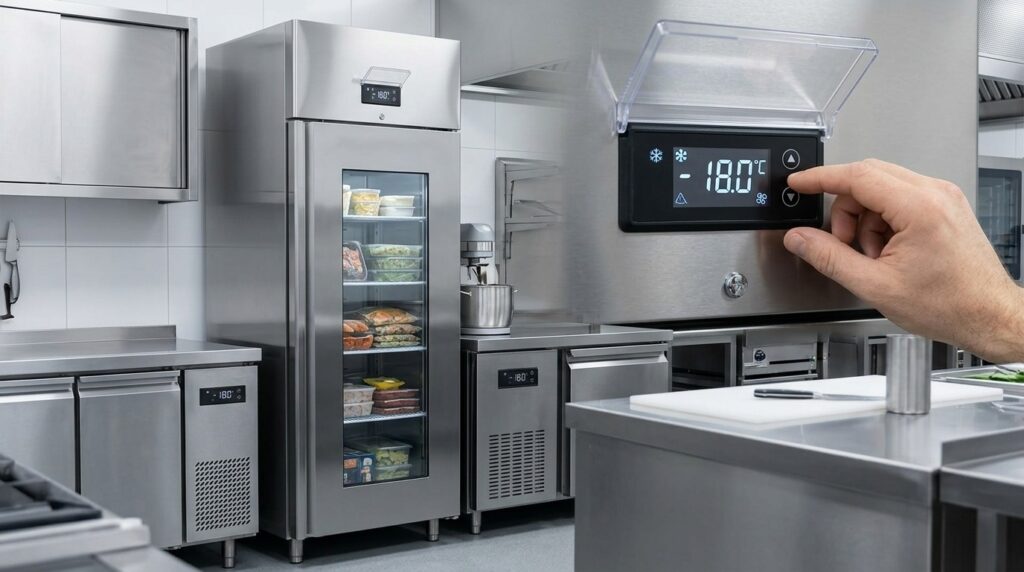
Learn to adjust Unifrost F410SS freezer settings for optimal use in Ireland's hospitality sector. Improve efficiency and compliance.
Unifrost F410SS Upright Freezer Temperature Controller Settings (Ireland)
You use the Unifrost F410SS upright freezer to keep frozen stock safe, pass checks, and avoid waste, but the controller only delivers that if the key settings match how your kitchen actually runs. Set too warm and you risk food safety and complaints. Set too aggressive and you invite unnecessary compressor run time, icing, and nuisance alarms.
This guide shows you what to check and adjust on the F410SS digital temperature controller for Irish hospitality use, including a practical target set point within the F410SS operating range (around -10°C to -25°C), how differential affects product temperature swings, and how defrost timing and alarms influence reliability in busy kitchens. You will also learn what to do on delivery day, how to steady the cabinet after heavy loading or frequent door openings, how to lock settings so staff cannot change them accidentally, and what controller-side troubleshooting steps to take if the freezer will not pull down to temperature.
What this support page helps you find
This page walks you through setting up and using the Unifrost F410SS upright freezer’s digital temperature controller, with the aim of keeping frozen stock stable and compliant in a working Irish kitchen. For day-to-day food safety, you are typically working to -18°C product temperature, in line with the FSAI guidance on keeping frozen food at -18°C or colder.
The controller set point matters, but it is not the full picture. Door openings, loading patterns, kitchen ambient temperature and defrost cycles all influence what the food actually experiences.
What “good settings” look like for an F410SS in Ireland
You are looking for a freezer that:
Pulls down to temperature reliably after deliveries and restocking
Recovers quickly after busy service
Avoids constant alarm events
Does not run in tight on/off cycles that shorten component life
In practice, that means choosing a sensible set point, using a reasonable differential so the compressor is not short-cycling, and making sure defrost is doing its job without keeping the cabinet warm for longer than it needs to.
What you’ll learn to do on the controller (without guesswork)
You will be able to:
Read the display properly and understand what temperature the controller is showing
Check the current set point and adjust it using the standard button layout used across Unifrost upright freezers
Do the basic operator checks first, before changing settings
Those checks include confirming the door is sealing, airflow inside the cabinet is not blocked, and the freezer has had time to pull down after loading.
Which other Unifrost upright freezers this applies to
The controller approach here is written for the F410SS and is generally relevant to other Unifrost upright freezer models that use similar digital controls, including F410SSOG, F620SV, F1000SV, F1300SV and F1310SV.
Controller versions can differ. Where menu layout or parameter names change, this page stays focused on the decisions you need to make on site and points you to the correct manual or guide when you need model-specific button sequences.
What you should not change during service, and why
Letting staff alter core parameters mid-shift often creates avoidable temperature swings, nuisance alarms and HACCP paperwork issues. It can look like “the freezer is acting up” when the real problem is settings and workflow.
This guide separates:
Adjustments that are safe for operators to make
Settings you should only change with the manual in front of you, ideally at a quiet time when you can monitor pull-down and recovery
That practical how-to is supported with the relevant manuals, guides and support resources for the F410SS controller.
Manuals, guides, or support resources available here
To find the right manual, setup guide, or support resource for a Unifrost F410SS upright freezer (including temperature controller settings), start with what’s on the cabinet itself: the rating plate and the controller fascia. That tells you the exact model code and controller type, so you can download the matching PDFs and avoid following “nearly the same” instructions from a similar-looking unit.
If you’re changing anything beyond the set point, keep it grounded in food safety practice. For frozen storage in Ireland, -18°C is a common long-term holding target. Refer to the FSAI’s temperature control guidance and record any changes as part of your HACCP routine:
https://www.fsai.ie/business-advice/food-safety-standards/temperature-control
1. Confirm the exact model and controller before you download
Check:
The rating plate for the full model code (for example, F410SS variants).
The controller face (button layout and display style).
This matters because similar Unifrost uprights can use different controllers, and the same setting can be labelled differently depending on the controller family.
If you have more than one Unifrost upright on site (for example, an F410SS and another variant), match each manual to the exact model code, not “close enough”. It saves time when you’re fault-finding during service.
2. Use the Owner Hub for the shared digital controller “how-to”
If your F410SS uses a controller layout shared across multiple Unifrost upright freezers, the Upright Freezer Temperature Controller Deep Dive Owner Hub is the practical day-to-day reference. It’s the right place to check:
What the display is actually showing
How to view the set point
What the core buttons do (set, up/down, defrost)
How to acknowledge alarms properly
It’s also a good training link for staff who need to do checks and respond to alarms, without giving them a reason to start changing parameters mid-shift.
3. Download the correct manual and keep an “operations copy” on site
Once you have the correct F410SS manual PDF:
Save it somewhere your team can access quickly (site tablet, shared drive, or a controlled staff folder).
Print the key controller pages for the HACCP folder if that’s how your site runs handovers.
In a working kitchen, the manual is often used less for reading and more for settling questions quickly after a power cut, an alarm, or a staff changeover.
If you can’t see a specific F410SS manual on the page you’re on, go back to the Unifrost.ie manuals/support resources area and search by the exact model code from the rating plate.
4. Advanced settings: change safely (defrost, differential, alarms)
For anything beyond the basic set point, use both:
The controller deep-dive guide (for what the parameter does)
The model manual (for what’s appropriate for that cabinet)
In practice, changing defrost frequency, differential, or alarm thresholds can solve a real issue, but it can also create new ones, including:
Bigger temperature swings
Nuisance alarms
Ice build-up, especially in hot prep areas with frequent door openings
If you do need to adjust advanced parameters:
Write down the original values first
Make one change at a time
Verify with your normal HACCP checks rather than relying on the cabinet display alone
5. Know when to stop tweaking and move to support
If the freezer isn’t pulling down, is repeatedly alarming, or is icing heavily, more parameter changes often slow you down.
Before you contact support, capture a clear fault description:
Displayed temperature and set point
Any alarm code
Room conditions (hot kitchen, door openings)
Whether product was loaded warm
Time since last defrost (if known)
Then send Caterboss those details if you need further help. It speeds up diagnosis and reduces the risk of masking a mechanical issue by over-adjusting the controller.
Optimal temperature settings for safe storage
For frozen storage, you are working to one practical rule: keep food at or below -18°C. That is the benchmark most Irish HACCP checks work from, and the FSAI notes food can remain frozen as long as the freezer temperature stays below -18°C (FSAI guidance).
The important bit is that the set point on the controller is not the same as the warmest product temperature inside the cabinet. Door openings, warm deliveries, a hot kitchen, and how the freezer is loaded all affect the warm spots first, usually near the door and higher shelves.
What temperature should you actually set for day-to-day use?
In real kitchens, many operators set a little colder than the legal and food safety benchmark so the cabinet has room to swing during service.
A working target of -18°C to -22°C is a sensible range for routine foodservice storage:
cold enough to protect compliance and stock quality,
without driving the unit harder than it needs to all day.
If your service is busy and the door is opened constantly, the “right” set point is the one that keeps the warmest point in the cabinet from creeping above -18°C during peak periods, not the one that looks perfect first thing in the morning.
Staying below -18°C during Irish service conditions
It is easy to be comfortably cold at 7am and still struggle at 7pm. In a tight line or small prep area, repeated door openings and quick stock grabs add up. If you run a café, takeaway, pub kitchen, or any operation with frequent access, setting a few degrees colder than -18°C is often what protects you when it is busiest.
Choosing a set point that holds steady (not just on the display)
Use your actual workflow as the deciding factor:
Warm or mixed-temperature loading: If you regularly put in deliveries that are not fully down to temperature, or you are moving product in bulk, a colder set point helps recovery time so you are not hovering around -18°C afterwards.
Lightly loaded cabinets: Less frozen mass means temperatures move faster when the door opens. A slightly lower set point can help reduce peak swings.
Overloading and blocked airflow: If shelves are packed tight or boxes block air paths, you can get uneven temperatures even when the controller looks fine. Correct loading and clear airflow matter as much as the number you set.
If you are changing anything beyond the set point, follow the official manual guidance for the controller used on the unit. If you are unsure, it is worth getting advice before adjusting control settings that affect alarms, defrost behaviour, or temperature stability.
Adjusting temperature controller settings
On most Unifrost upright freezer controllers, you’ll see the current cabinet temperature on the display. The set point and deeper settings (like differential and fan behaviour) sit behind the SET/menu functions. Make changes in small steps, then give the cabinet time to settle before you judge the result.
1. Confirm your target temperature before changing anything
For Irish hospitality use, frozen storage is typically managed to keep product at or below -18°C. Set points often need to be a bit colder than that to allow for door openings, loading, and busy service.
The Food Safety Authority of Ireland notes frozen food can continue to be kept frozen as long as it remains below -18°C (FSAI guidance).
Before you adjust settings, take a quick look at the real-world pressures on the cabinet:
Sited beside hot equipment (grill, fryer, combi)?
Heavy service with frequent door openings?
Overfilled shelves blocking airflow?
Stock going in not properly frozen?
If any of those apply, fix the basics first. Controller tweaks won’t compensate for poor airflow or heat load for long.
2. Read the display properly (actual temperature vs set point)
The display temperature will naturally move around, especially:
after door openings,
during pull-down after loading,
during defrost.
Don’t “chase” that number by constantly changing the set point. If your controller has status lights for cooling/defrost/alarm, check what’s running. If it’s in defrost, wait until it finishes before deciding the freezer is underperforming.
3. Adjust the temperature set point (the only routine change most operators should make)
For day-to-day adjustment:
Press and hold SET until the set point value appears (often flashing).
Use UP/DOWN to change the value.
Press SET again to save, or wait a few seconds for auto-save (depends on the controller).
After a meaningful change, allow time for the unit to stabilise. In a working kitchen, an upright freezer may need hours, not minutes, to settle, especially after a stock-in or a busy service.
4. Fine-tune the differential (only if you understand the trade-off)
The differential is the temperature gap that decides when cooling cuts in and out:
Smaller differential: steadier temperature, but more compressor starts.
Larger differential: fewer starts, but a wider temperature swing.
If you can access the differential parameter without going into an installer/service menu, adjust it in small steps and watch behaviour over a normal service pattern. If the freezer is short-cycling in a high-traffic kitchen, a slightly wider differential can help, but only if your product still stays safely frozen at the warmest points.
If accessing differential requires a coded menu or you don’t have the correct controller manual to hand, leave it alone. Random parameter changes are a common cause of nuisance alarms, icing issues, and slow recovery.
5. Treat fan cycle settings as service-level unless you have a clear reason
Fan behaviour varies by controller and cabinet design. Common options include:
fan runs with compressor,
fan runs continuously,
fan stops during defrost,
fan stops on door open (if a door switch is fitted).
Only change fan settings if you’re solving a specific operational problem and you know what the setting does. The wrong fan behaviour can:
increase icing (especially with frequent door openings),
dry out uncovered product,
slow recovery if airflow is reduced at the wrong time.
In most Irish sites, you’ll get a better result by keeping fan settings at factory defaults and focusing on root causes like airflow, loading, door seals, and condenser cleanliness.
6. Validate the result for HACCP and real service, not just a quiet moment
Once you’ve made changes, check performance when the freezer is under pressure:
after repeated door openings,
during peak service,
near the door and upper shelves (often the warmest areas in day-to-day use).
If you keep HACCP records, log temperatures at a consistent time and note abnormal events (power cut, stock-in rush, door left ajar). If alarms or high readings persist after sensible set point changes, stop adjusting and start diagnosing: airflow restrictions, dirty condenser, failed door gasket, or a defrost/fan fault.
At that point, having the correct F410SS/controller manual in front of you matters more than further trial-and-error, especially for parameter names, lockouts, and alarm definitions.
Customising advanced controller parameters
If you want to change advanced controller settings on a Unifrost F410SS upright freezer, treat it like a controlled change, not a bit of trial-and-error. Start with the set point only, then observe performance over a full trading day before you touch defrost intervals, differential or alarms. If the cabinet starts alarming repeatedly, cannot recover after door openings, or struggles to hold temperature with the door closed, stop tweaking and treat it as a service issue.
1. Set your non-negotiables first
For Irish food businesses, the priority is safe frozen storage and consistent recovery, not chasing the coldest display reading.
The Food Safety Authority of Ireland notes frozen food can remain frozen if it stays below -18°C in its guidance for food businesses dealing with disruption (FSAI advice for food businesses).
In practice, set the controller so you achieve stable product temperatures that meet your HACCP target under real conditions: busy service, frequent door openings, deliveries, and warm kitchen ambient. If the freezer sits near heat or in a tight, poorly ventilated space, you often get better results by prioritising stability and recovery rather than pushing an aggressive set point.
2. Make reversible changes and protect your warranty position
Advanced parameters can improve or ruin performance, and they can also hide the real fault when something is going wrong. Keep it controlled:
Record the current values first: set point, differential (hysteresis), defrost schedule and alarm thresholds.
Take photos of each menu screen so you can revert exactly.
Log what you changed, why, and when in your site HACCP or maintenance record, especially in multi-shift or multi-site operations.
If you are not sure what a parameter does on your exact controller, do not change it “to see”. That is how you end up with icing, short cycling, nuisance alarms, or a cabinet that looks fine on the display but performs poorly in service.
3. Adjust the set point first, then leave differential alone unless you have a clear symptom
The lowest-risk optimisation is usually the set point only. After you change it, give the freezer time to stabilise with the door closed, then watch how it behaves during a normal shift. Short swings on the display during prep are expected. What matters is whether it pulls back reliably and whether product stays hard frozen.
Only consider changing the differential if you can clearly describe the problem you are trying to solve, for example:
Excessive compressor cycling in a quiet site.
Slow recovery after door openings even though loading and airflow are correct.
Changing differential without a specific symptom can increase temperature swings, complicate HACCP checks, and contribute to frost build-up.
4. Change defrost and alarms only when there is a real operational reason
Defrost settings are there to deal with moisture entering the cabinet and freezing on the evaporator. Door habits and kitchen humidity drive most of it.
Before you adjust defrost parameters, check the basics that settings cannot fix:
Door seals and door closing properly
Product not blocking air paths
Excessive warm stock going in at once
Condenser cleanliness and ventilation clearance around the unit
Alarm settings should support your operation, not train staff to ignore beeping. If alarms are too tight, you get nuisance alerts during busy periods and people start muting them. Too loose, and you lose early warning when a door is left ajar after a delivery or the cabinet struggles in high ambient conditions.
A useful rule: only change defrost or alarm parameters when you can state the symptom plainly, then check over the next few shifts whether the change improved it.
5. Lock the controller down for day-to-day use, and know when to stop
In a rotating team, accidental set point changes are common. If your controller supports it, use the lock function. If not, agree a simple site rule: settings only changed by the duty manager, and only with a log entry showing before and after values.
Stop adjusting settings and move to fault-finding if:
The freezer cannot reach target temperature after a reasonable settling period
Alarms persist with the door closed
Performance changes suddenly after months of stable operation
At that stage, settings are rarely the root cause. Check loading, seals, condenser cleanliness and ventilation first, then move to proper technical support. It also helps to have the correct manual and controller guide for your exact F410SS variant so you know what each parameter does before you touch it.
Troubleshooting common issues
Start by confirming whether you have a real temperature problem or just an alarm condition. Check the controller display against an independent probe reading. Then work through the likely causes in order: door sealing and loading, airflow and vents, room conditions, and only then controller settings like set point and defrost. Clear the alarm and give the cabinet time to pull down before you change anything else. Fast tweaks often hide the real fault. If frozen food safety is at risk, treat it as a HACCP issue as well as an equipment issue.
1. Confirm what the controller is actually telling you
The cabinet controller will usually show either the current cabinet temperature or an alarm state.
If you see an alarm message or symbol, write it down exactly (including any letters) and note what the freezer is doing:
Can you hear the compressor running?
Are the internal fans running?
Is there warm air coming off the condenser area?
Avoid changing parameters at this point. It is easy to “clear” an alarm while the underlying issue continues.
2. Verify temperature with a separate thermometer before acting
For troubleshooting, always take a second reading with a sanitised probe or a calibrated thermometer. Check product temperature where possible, or use an immersed glycol simulator if that is part of your HACCP routine.
For frozen storage, the usual expectation is food held at or below -18°C (see FSAI storage guidance: https://www.fsai.ie/consumer-advice/food-safety-and-hygiene/storage). If food is holding safely but the display is swinging, it is often down to normal door-opening recovery, sensor position, or alarm thresholds that do not suit your service pattern.
3. Fix the “usual suspects” behind warm alarms and slow pull-down
Most “not getting to temperature” issues in busy Irish kitchens come back to airflow and heat load.
Work through these first:
Door closing and gasket seal: Make sure the door shuts cleanly and is not being held open by boxes, shelf clips, or a lifted gasket edge.
Loading and airflow: Don’t pack stock tight against the back wall or over internal air outlets. Upright freezers rely on clear air circulation.
Warm stock in bulk: A big delivery of unfrozen or partially frozen product will push temperatures up. Expect a longer pull-down time.
Room conditions: If the freezer sits beside cooking equipment or in a hot prep area, recovery after openings will be slower. Improve ventilation around the unit or consider relocating it.
4. Check controller settings safely (set point first, then alarms and defrost)
If temperature is genuinely high, confirm the set point has not been raised accidentally before adjusting anything more technical. As a practical baseline, frozen storage is normally managed around -18°C or colder (FSAI link above). Avoid quoting or relying on a model-specific operating range unless you have the exact manual for the controller fitted on your unit.
Use this order:
Confirm the set point is correct for your operation.
Check whether a manual defrost has been triggered and is still running.
Review any temperature differential/hysteresis setting that might allow wide swings before cooling restarts.
If alarms are frequent but food is staying safe, check whether alarm thresholds and delay times are too aggressive for a busy kitchen where the door opens regularly.
If you are unsure what a parameter does, stop and use the correct controller manual for your unit. Incorrect defrost settings can lead to icing, restricted airflow, and repeat alarms.
5. Clear the alarm and allow recovery time before judging the result
Once you correct a physical issue or return the set point to where it should be, acknowledge and clear the alarm on the controller (method varies by controller type). Then keep the door closed and let the cabinet pull down.
Be realistic about recovery time. After a delivery load or a door-left-open incident, a freezer can take a while to stabilise. If temperature is trending down steadily, the issue is often load, door discipline, or airflow rather than a controller fault.
6. After a power cut or “door left open”, make a food safety decision and document it
If the freezer has been off, treat it as a HACCP event as well as a troubleshooting job. The FSAI advises checking food condition and temperature after a power cut (https://www.fsai.ie/consumer-advice/food-safety-and-hygiene/storage), so don’t rely on the controller display alone.
Record what you found and what action you took. If you use the Safe Catering Pack approach, FSAI Recording Form 2 (Refrigeration) is designed for logging fridge and freezer temperatures: https://www.fsai.ie/publications/safe-catering-pack-record-books
If you need the exact button sequence and parameter names for the controller fitted to your freezer, pull it from the correct manual rather than guessing. If you are sourcing that through Unifrost, use the relevant owner support hub/manual for your specific controller variant.
Comparing F410SS with other models
The useful question is not “what number do I set?”, it’s how the same controller logic behaves when you move up or down the Unifrost upright freezer range in a real Irish kitchen. Most of the settings are familiar across models, but cabinet volume, how you load it, where it sits, and how often the door is opened will change what works in practice.
As a rule, start with product temperature and recovery. Then adjust differential, defrost and alarms to suit how the freezer is actually used, not how you wish it was used on a quiet morning.
How the controller settings carry over across the Unifrost upright freezer range
Models like the F410SS, F410SSOG, F620SV, F1000SV, F1300SV and F1310SV are often compared together because the day-to-day controller ideas are the same:
Set point: your target cabinet air temperature.
Differential: how far temperature drifts before the compressor cycles again.
Defrost parameters: timing and behaviour that affects ice build-up and temperature stability.
Even where the button sequence differs by controller version, the decision process carries over. You are always trying to achieve: stable temperature, decent recovery after door openings, controlled defrosting, and alarms that flag a genuine issue rather than creating noise during service.
F410SS vs larger uprights (F1000SV, F1300SV, F1310SV) in Irish service conditions
Bigger uprights are more likely to be treated as a store freezer or section freezer in hotels, nursing homes and higher-volume kitchens. In practice they often see:
deeper loading (slower air circulation if stock is packed tight),
longer door openings for picking and stock rotation,
tougher placement (near hot passes, dish areas, combi vents, or busy corridors).
That combination can mean you need to be more conservative with settings and alarms. Not because the controller is different, but because the cabinet is being asked to cope with more warm air ingress and more varied loading.
On defrost, resist the temptation to “solve frost” by simply setting the unit colder. If you’re seeing frosting, fan-area icing, or doors that are hard to close, the fix is usually operational first (reduce warm air ingress, check door seals, avoid blocking airflow), then adjust defrost scheduling to match your site conditions. High humidity and heavy door traffic can make this more obvious, particularly in kitchens where external doors are opening frequently.
F410SS vs smaller or differently used uprights (F620SV) for cafés, pubs and takeaways
A smaller upright like the F620SV is often bought for a tighter footprint, a narrower menu, or as overflow storage. The F410SS, by comparison, is more likely to end up as the main kitchen “go-to” freezer, which usually means more access and more chances for temperature swing during rush periods.
In busy service, the biggest gains usually come from how it’s used rather than constant controller tweaking:
keep stock organised so the door isn’t held open while someone searches,
avoid overfilling to the point it restricts airflow,
train staff to close the door fully every time, especially where the kitchen floor isn’t perfectly level.
For food safety, keep your targets aligned with accepted frozen storage practice. The FSAI notes that food that is still frozen can remain frozen as long as the freezer temperature is below minus 18ºC. Your aim is to stay comfortably the right side of that threshold under normal trading, not just when the kitchen is quiet.
What to standardise across models, and what to tune per site
Standardise the basics so staff are not re-learning each cabinet under pressure:
one temperature policy that fits your HACCP routines,
a clear rule on who can change settings,
a simple check routine (for example, verifying the display at set times and logging exceptions).
Tune what depends on the job and the location:
Set point and alarm tolerance should reflect door-opening frequency and how quickly you need recovery during service.
Differential should balance short cycling (running cost and wear) against temperature drift that shows up in your logs.
Defrost schedule should match actual humidity and door traffic. If frost is building, fix the cause first, then adjust timing.
Lockout or supervisor-only control is worth considering where multiple shifts or agency staff have access.
If you need the exact parameter names and button sequence for your controller version, use the official manual or the Unifrost owner resources rather than trial-and-error on a live freezer during service.
Connecting to the Unifrost support ecosystem
Controller settings work best when you treat them as part of your day-to-day control routine, not a once-off tweak. Start with the food safety baseline. In Ireland, the FSAI points operators towards keeping frozen food at or below -18°C as good practice for storage and monitoring (see the FSAI guidance on temperature control).
After that, the “right” set point and defrost behaviour depends on how the freezer is actually used: ambient heat in the kitchen, door openings during service, how it’s loaded, and how quickly you need it to recover after a busy spell.
Use the right support layer for the problem (operator fix vs technical support)
If the aim is simple, keep it simple. Things like preventing staff from accidentally changing the temperature, or standardising a set point for HACCP records, are usually operator settings. That’s where the Unifrost owner-style guidance is most useful, because it keeps you focused on the few settings you should touch day-to-day and the few you should leave alone.
If you’re seeing repeat alarms, slow pull-down after a delivery, heavy ice build-up, or big swings between the displayed temperature and what product feels like, it’s rarely solved by chasing the set point. That’s when you move from “settings” to structured troubleshooting. The root cause is often airflow, loading, door discipline, condenser cleanliness, or a defrost issue, rather than one controller value.
What to note before you ask for help (so you get a useful answer first time)
You’ll get a better answer faster if you bring the right details, especially where you have multiple Unifrost uprights on site using similar controller logic. Capture this once and keep it with your kitchen paperwork so you’re not relying on memory mid-service:
Model and serial from the rating plate, the current set point, and any alarm code shown on the display.
Your operating reality: where it sits (beside the hot line, near pot wash steam, tight back-of-house), door opening frequency at peak, and whether it’s lightly loaded or packed (boxed product and blocked vents are common culprits).
What changed: power cut, big delivery and warm stock going in, door left ajar, a deep clean, or a move that changed ventilation clearance.
That context keeps the call focused and helps you avoid “fixes” that create new problems, like stretching defrosts to reduce run time and then fighting ice and poor airflow a week later.
Keeping settings stable in a busy kitchen (training, lockouts, and accountability)
In a lot of Irish kitchens, the biggest controller risk isn’t technical failure. It’s a well-meaning person pressing buttons because the display looks “wrong” during a rush.
Decide who can adjust the set point and any defrost-related parameters, and make it part of your open and close routine alongside temperature logging. If your controller supports keypad locking or supervisor-only access, use it once you’ve agreed standard settings.
If you’re not sure whether a parameter change could affect performance or support cover, keep changes to basic set point adjustments only, and check the relevant manual or Unifrost guidance before altering advanced settings (defrost timings, differentials, alarm parameters).
How this connects to the wider Unifrost ecosystem (consistent controller logic across uprights)
Where Unifrost uprights share the same controller approach, you can standardise how you train staff, how you log temperatures, and how you triage issues, even if the cabinet sizes differ. That reduces avoidable setting changes, speeds up fault-finding, and makes it easier to compare “normal” behaviour between units when one starts to struggle.
For anything model-specific, manuals and the correct PDF for the exact unit are the safest reference. Keep them accessible to whoever opens and closes the kitchen, not buried in an email chain.
Frequently asked questions
What temperature should my commercial upright freezer be set to for safe frozen food storage in Ireland?
For most Irish hospitality operations, aim to hold product at -18°C or colder for safe long term frozen storage and straightforward HACCP compliance.
Practical approach:
Set point: start at -20°C to give a buffer for busy service periods.
Verify with a probe: check a core temperature (or a calibrated air probe placed in a glycol bottle) rather than relying only on the display.
Allow pull down time: after loading or delivery, give the cabinet time to recover before judging performance.
The Unifrost F410SS is typically operated within an approximate -10°C to -25°C range, which supports these targets when correctly installed and maintained.
How do I adjust the temperature set point on a Unifrost upright freezer’s digital controller?
Most Unifrost upright freezers use a similar digital controller layout. The usual method is:
Press and hold SET until the set point value appears (often it flashes).
Use ▲ / ▼ to change the set point.
Press SET again to confirm, or wait a few seconds for it to save automatically.
Tips that prevent callouts:
Make changes in small steps (for example 1°C at a time) and reassess after the cabinet stabilises.
If buttons do nothing, look for a keypad lock feature. Unlocking is commonly done by holding a key combination (varies by controller version), so refer to the model’s controller guide or manual if you are unsure.
What troubleshooting steps should I follow on the F410SS controller if the freezer is not reaching the set temperature?
Work through these checks in order before changing advanced parameters:
Confirm what’s warm: check both the display temperature and an independent probe reading. If the probe is fine but the display is not, you may have a sensor or placement issue.
Check door sealing and use: make sure the door closes fully, gaskets are clean, and staff are not propping the door during service.
Look for airflow restrictions: keep product off the back wall and avoid blocking internal air paths. Do not overpack shelves.
Clean the condenser (common cause): if the condenser is dusty, performance drops and run times climb. Isolate power and clean the condenser as per the maintenance guide.
Verify defrost behaviour: if the unit is icing up, it may be stuck mid defrost or not defrosting effectively. Check whether a manual defrost has been activated and allow the cycle to complete.
Check installation conditions: ensure there is adequate ventilation clearance and the freezer is not beside a heat source (dishwasher, fryer, combi vent).
Review alarm indicators: note any alarm symbols/codes shown and when they occur (start-up, after door openings, overnight). Share this with service support.
If it still will not pull down to temperature after these basics, avoid changing hidden settings blindly. Record the model details, the set point, ambient conditions, and any alarm info, then contact support for the correct next step.
Next step
If you want to compare cabinet options across sizes and door formats, you can explore more Unifrost upright freezers. If you tell us your typical load, service pattern, and kitchen conditions, we can recommend a sensible set point and controller approach that keeps you stable at -18°C or colder without unnecessary energy waste.
Related Unifrost guides
Compare models, maintenance advice and support information related to this topic.
Unifrost F410SS Upright Freezer: Layout, Controller, and Energy Saving Hub
Optimize your Unifrost F410SS for layout, controller use, and energy efficiency in Irish kitchens.
Read guide
Unifrost F410SS Upright Freezer Temperature Troubleshooting Guide
Troubleshoot your Unifrost F410SS freezer's temperature issues with our expert guide for Irish kitchens. Practical, step-by-step support.
Read guide
Unifrost Counter Fridge Prep Counter Saladette Manuals and Installation Support
Manuals, controller guidance, setup checks and troubleshooting help for Unifrost counter fridges, prep counters and saladettes.
Read guideCompare Unifrost freezer options on Caterboss
For current product options, pricing and availability, continue to Caterboss.