
Understanding the Unifrost F410SS Upright Freezer: Temperature Alarm Basics for New Owners
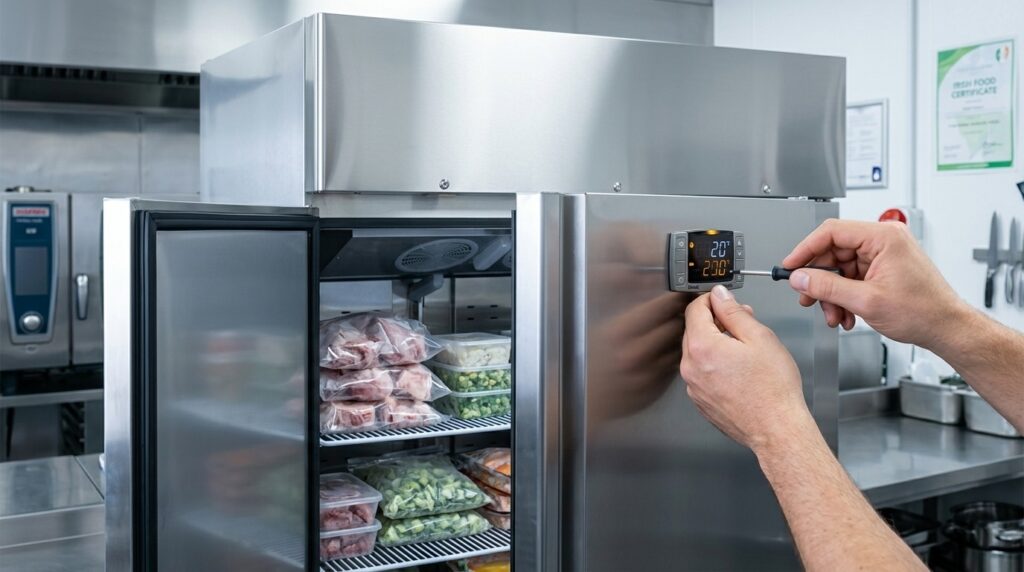
Discover the essentials of managing temperature alarms on your Unifrost F410SS upright freezer for optimal performance in Irish kitchens.
Unifrost F410SS Upright Freezer: Temperature Alarm Basics for New Owners
If you have just installed a Unifrost F410SS (or F410SSOG), the temperature alarm is one of the first things that can disrupt service. It protects stock and HACCP compliance, but it can also create nuisance beeps during start up, after loading warm product, or when the door is opened repeatedly.
This page helps you make the practical decisions a new owner needs to make: how to read the electronic controller display, how to check and adjust the temperature set point and alarm thresholds without masking a real problem, and how long to allow for pull down and defrost before you escalate.
You will also learn what to do when an alarm happens in real time, including:
How to silence or acknowledge an alarm while keeping food safety controls in place
How to tell a normal high temperature alarm event from a fault that needs immediate stock checks
The common causes you can check yourself (loading patterns, ventilation, door habits, basic cleaning)
What to record for HACCP and what model and serial details to gather before you contact Caterboss support
Why this topic matters in commercial use
A temperature alarm on an upright freezer is not just an annoyance. It is your early warning that the cabinet may be drifting outside safe limits, which puts stock, service, and compliance at risk. For Irish food businesses, maintaining the cold chain sits under the hygiene requirements of Regulation (EC) No 852/2004. If you dismiss a beeping controller as “the freezer acting up”, you can miss a genuine control issue and end up explaining a temperature excursion when HACCP records are reviewed.
The important bit is judgement. Not every alarm means the freezer is faulty. A short high-temperature alarm can be triggered by normal day-to-day use such as loading warm product, heavy door opening during service, or poor airflow around the cabinet. The job is knowing when it is a real problem and when it is an operational issue you can fix on the spot.
Why alarms are more than “noise” in Irish service conditions
In a busy Irish kitchen, freezer doors get a hard life. Hotels and banqueting kitchens batch-load. Pubs pull frozen lines in short bursts. Cafés often squeeze the unit into a tight back store beside heat and steam. Those realities increase nuisance alarms, but they also make genuine faults easier to miss unless you have a consistent “what does this alarm mean and what do we do next?” routine.
The controller is doing two jobs: running cooling/defrost and flagging abnormal conditions. If you understand the alarm, you can act early and avoid the slow, expensive failure pattern where the cabinet seems fine all day and then loses temperature overnight.
How temperature alarms support HACCP and protect your stock value
Alarms help you answer two HACCP questions quickly: did we lose control, and what action did we take? FSAI guidance on prerequisite programmes makes it clear that refrigeration operation, maintenance, and temperature control are part of your food safety management system, not an optional extra. See the relevant FSAI guidance here: prerequisite programmes and cold chain/prerequisite-programmes).
There is also a straight commercial cost angle. Frozen protein, prepared portions, desserts, chips, allergen-sensitive items, and event stock represent real money. Handled well, an alarm is a quick interruption and a note in the log. Handled poorly, it turns into a full stock check, a wastage decision, and a service problem that drags on.
Why staff training reduces repeat alarms and unnecessary call-outs
Repeated temperature alarms are often caused by day-to-day behaviour or setup, especially in the first few weeks when staff are getting used to a new controller. Common causes you can control include:
Door not fully closed after a busy pick
Overloading that blocks internal airflow
Loading product that is not pre-chilled
Restricted ventilation because the cabinet is boxed into a tight space
Once you understand what the controller is warning you about, it is easier to train staff to acknowledge an alarm properly without ignoring it, and to decide when it needs an immediate stock check versus when it can be monitored while the cabinet pulls back down. That leads into the practical part: the key temperature alarm settings and what to adjust for your kitchen.
Key temperature alarm settings and adjustments
How do you read, adjust, and set sensible default temperature and alarm settings on a Unifrost F410SS upright freezer controller?
Start by confirming whether the controller is showing the live cabinet temperature or the set point. Then set a practical frozen storage target for HACCP use, and review alarm limits and delay so you get a useful warning without constant nuisance alarms during loading. Finally, sanity-check the display against a separate thermometer and record the final settings so staff respond consistently under pressure.
1. Confirm what the display is showing before you change anything
On upright freezers, the controller will usually show the live cabinet temperature in normal operation and the set point only when you enter the set-up screen.
Before you adjust anything, watch the display for 20 to 30 seconds:
If the number drifts up and down gradually, you are likely looking at the live temperature.
If you press the set point key (often labelled SET) briefly and the display switches to a fixed value, that is typically the set point.
Keypads and controller versions vary. If the labels or behaviour do not match what you expect, do not guess. Use the correct manual for the controller fitted to your cabinet.
2. Set a practical frozen storage target for Irish HACCP operation
For day-to-day food safety management, you want frozen stock held at -18°C or colder. The FSAI uses below -18°C as a useful operational reference point for frozen food remaining acceptable to keep frozen (FSAI guidance).
In a working kitchen, many operators set the set point a bit colder than -18°C to allow for:
Door openings during service
Loading warm product (even if it is “frozen”, it may not be at cabinet temperature)
Slower recovery in tight, hot kitchens or poorly ventilated back-of-house areas
The right target depends on your workflow. If the door is opening constantly, recovery time matters as much as the number on the screen.
3. Adjust the temperature set point (without chasing the number)
Keep set point changes deliberate and consistent. Frequent tweaks create confusion for staff and make alarm events harder to interpret.
Typically, you will:
Enter the set point screen (often press and hold SET until the value appears or flashes).
Adjust with the up/down keys.
Press SET again to save.
After saving, leave the freezer to stabilise. The cabinet temperature will not settle immediately after a defrost, a first start-up, or a heavy load-in. Give the unit time to pull down before deciding a setting “hasn’t worked”.
4. Set alarm thresholds and alarm delay to suit real service conditions
You want an alarm that catches genuine risk to frozen stock, not one that goes off every time someone loads a box or holds the door during prep.
Use these as sensible starting principles, then tune to how your kitchen actually operates:
High temperature alarm: set it to warn you before you get close to the -18°C boundary, not after you have crossed it.
Alarm delay: long enough to ride out normal loading and short door openings, but short enough that a door left ajar does not go unnoticed.
Low temperature alarm: low enough to avoid nuisance trips in normal operation, but still able to flag an abnormal “too cold” reading (which can point to a control or probe issue).
If you are not sure what a parameter does on your controller (high/low alarm, delay, probe offset), avoid adjusting advanced settings like probe calibration or defrost parameters on a live food freezer. If you change the wrong value, you can end up with a cabinet that appears “quiet” but is no longer protecting stock properly.
5. Acknowledge or silence an alarm without disabling protection
In service, the priority is often stopping the beeping while you check what is happening. Use the controller’s alarm mute/acknowledge function if fitted (often a bell or alarm icon).
Avoid changing alarm settings just to stop noise. Silencing should acknowledge the event, not disable alarms long-term. If alarms are routinely turned off, you lose early warning, and your HACCP checks become a paperwork exercise rather than a working control.
6. Validate the reading and lock in a simple routine for staff
Once the freezer has stabilised, check the displayed temperature against a separate freezer thermometer placed:
In the cabinet body (not in the door)
Away from the air outlet
If there is a consistent gap, stop tweaking settings and treat it as a troubleshooting issue.
Record the final set point and alarm choices in your HACCP file so the head chef, duty manager, and relief staff are all working from the same baseline. For the correct controller manual and parameter definitions for the F410SS family, use the Unifrost.ie manuals and support downloads area so you are following the instructions for the controller actually fitted to your cabinet.
Common alarm scenarios and solutions
A temperature alarm on an upright freezer is there to prompt a check, not to add noise to your kitchen. If you ignore repeated beeping and a flashing high-temperature alarm, stock can drift towards partial thawing even if the cabinet still feels cold. That creates both a food safety risk and a quality issue (texture damage, refreezing, excess ice).
For frozen storage decisions, -18°C is the key reference point used in Irish food business guidance. The point of the alarm is to get you to confirm what’s happening, not to guess based on how cold the air feels. Many first-week alarms are nuisance events caused by start-up, loading, door use, or ventilation. Alarms that keep returning over an hour or two deserve a proper check, because that’s also how genuine faults tend to show up.
High-temperature alarm during first start-up (new install)
On first power-up, a high-temperature alarm usually means the controller has hit its alarm threshold before the cabinet has pulled down to frozen temperature.
What to do:
Keep the door closed.
Let the unit run until the temperature stabilises.
Avoid loading stock until you have a stable cabinet temperature. Every door opening adds warm air and slows pull-down.
A practical decision rule in an Irish kitchen is to treat “still rock-solid frozen” as your immediate marker, and use -18°C as the reference point for whether food can remain frozen. FSAI guidance notes: “Any food that is still frozen can continue to be frozen as long as the temperature is still below -18ºC”.
High-temperature alarm after loading (deliveries, transfers, batch prep)
If you load a large volume at once, or put in product that is warmer than the cabinet, the air temperature can spike quickly. The probe reacts fast, so you get an alarm even though the food itself may still be frozen.
You’ll see this most often:
After deliveries
After moving stock from another freezer
When someone tries to “quick-freeze” cooked items in a storage freezer
What to do:
Load in smaller batches where possible.
Avoid putting warm containers straight in.
Keep product clear of air paths so the cabinet can recover.
If you regularly need to freeze down hot food quickly, that’s usually a process mismatch, not a controller setting issue. A storage freezer is designed to hold temperature, not pull hot product down fast. That’s when a blast chiller is the right tool for the job.
Door-related alarm behaviour (busy service, training, gasket issues)
Doors held open, or doors not fully closed, pull in warm moist air. That drives temperatures up and increases ice build-up over time. The common pattern is alarms during peak service, then recovery when the kitchen quietens.
What to do:
Reduce door-open time and avoid using the freezer as a “search cupboard”.
Check the door closes cleanly without needing a slam.
If alarms happen even on quiet shifts, check the basics: door seal condition and whether the unit is crammed against a wall with no room to reject heat.
Probe fault or sensor-related alarms (erratic display, impossible temperatures)
If the controller displays an error or a probe-related alarm, the bigger issue is confidence. The displayed temperature may no longer represent what’s actually happening inside, which undermines HACCP records and decision-making.
What to do:
Verify the temperature with a separate, known-good thermometer.
Minimise door openings while you assess stock condition.
If the alarm returns immediately after acknowledgement, or the displayed temperature jumps unrealistically, it’s usually an engineer call rather than a settings tweak. Changing parameters will not fix a failed probe or wiring issue.
Nuisance alarms from ambient heat and poor ventilation (summer kitchens, tight back-of-house)
If the freezer is in a hot corner, beside cooking equipment, or boxed in with poor airflow, it will run longer and recover more slowly after door openings. That makes alarms more likely even when nothing has “failed”. You’ll notice this more in summer, in small cafés, and in tight older back-of-house layouts.
What to do:
Improve airflow around the cabinet where you can.
Keep it away from direct heat sources if possible.
Keep the condenser area clean so it can dump heat efficiently.
Once the physical basics are right, you can look at alarm delays and thresholds sensibly. Adjusting settings to silence alarms before fixing ventilation can mask a real performance problem.
Best practices for alarm management and staff training
Train staff to read an alarm as a prompt for action, not just a noise to stop. The basics are consistent first checks (door, loading, airflow), clear rules on who can change settings, and a simple way to record what happened for HACCP while it is still fresh. If an alarm keeps returning, treat it as a maintenance issue, not “one of those freezers that beeps”.
1. Agree roles and permissions before you get busy
On the F410SS (and similar Unifrost uprights), the controller is doing three things: controlling temperature, managing defrost, and flagging faults or temperature deviations. Your response should match the cause.
Set this in plain language:
Staff: acknowledge or silence an alarm, do first checks, and record what they found.
Duty manager / keyholder: decides on stock risk, contacts support, and is the only person who changes set points or any advanced parameters.
That one rule avoids well-meaning “tweaks” that create bigger food safety and call-out problems later.
2. Teach a standard first-response routine for any alarm
When the alarm sounds, the goal is to decide quickly whether it is a short, explainable temperature rise (loading, door left open) or something that needs escalation.
Train staff to check in this order:
Door fully shut (not sitting on a box, mat, liner, or a misaligned basket).
Seal closing properly (no packaging caught, no heavy ice build-up preventing closure).
Airflow inside the cabinet (stock not packed tight against air outlets, nothing blocking circulation).
Recent loading (warm stock just brought in from prep will trigger alarms in a busy kitchen).
In tight Irish back-of-house spaces, add one more practical check: the unit has not been pushed hard back against a wall or surrounded by cartons after cleaning, which can restrict ventilation and recovery.
If the alarm can be acknowledged/silenced, staff can stop the beeping, but they should not disable alarm protection. Keep the rule simple: you can silence it, you cannot turn it off, and you must re-check temperature and product condition within an agreed time window.
3. Build small daily and weekly checks that prevent nuisance alarms
Most “alarm problems” are operational patterns: bursty door openings, heavy reloads, cramped airflow, or doors not closing cleanly. Put checks into opening and close-down so they actually happen.
Keep one checklist with your HACCP records:
Daily: confirm the display temperature looks normal for your operation; check the door closes cleanly; quick visual scan that stock is not blocking internal airflow.
After heavy loading: note it and schedule a re-check later, rather than letting alarms become background noise.
Weekly: clear spills and packaging debris that stop baskets sliding properly and lead to doors being left ajar; make sure staff can find the model/serial label for support.
If alarms are frequent: check for nearby heat sources (dishwasher exhausts, ovens) and whether the cabinet has ended up in a tight gap with poor ventilation.
Keep it realistic. You are training for service pressure, not an ideal kitchen.
4. Treat alarm events as part of HACCP, not a separate “engineering thing”
For HACCP, the beep is not the point. What matters is a written record of the deviation, the checks completed, and the corrective action taken.
If you use the FSAI Safe Catering Pack, use Recording Form 2 (Refrigeration) to record fridge/freezer temperatures, and add a short alarm note alongside it:
time of alarm, displayed temperature, likely cause (door open, loading, unknown), what you did (closed door, improved airflow, quarantined suspect items), and a follow-up temperature reading.
Add a simple decision rule: if staff cannot explain the alarm, or temperature does not trend back within a reasonable period for a loaded upright freezer, the duty manager signs off and decides whether stock needs to be moved to backup storage.
5. Train escalation triggers and what to capture for support
The fastest route to a fix is a clear report, not “it was beeping again”. Train staff to capture details while they are standing in front of the cabinet:
Model variant (for example, F410SS or F410SSOG)
Serial number from the rating plate
What the display showed (temperature and any fault code)
Whether the alarm returned after being acknowledged
Escalate early if you suspect a probe/sensor fault, if the display is blank or clearly wrong, or if the door is closing properly but alarms keep returning in normal use. Avoid repeated power-cycling as a “solution”. It can remove useful fault history and wastes time when an engineer is trying to diagnose the issue.
Once your team handles alarms consistently, you can review controller settings like alarm delays and thresholds without creating nuisance beeps or accidental gaps in food safety control.
Leveraging Unifrost support resources
Most early issues with a new Unifrost F410SS are sorted faster when you start with the correct manual and controller reference, and give support the right ID details. It beats guessing settings mid-service. In Ireland, you also need food safety controls and records that stand up to inspection, including how you monitor and respond to temperature deviations, as set out in FSAI guidance on HACCP-based food safety management.
One practical point: a “temperature alarm” is not automatically a fault. Start-up pull-down, a heavy load, or defrost recovery can all trigger alarms in normal use. The difference usually shows up in the controller history, probe status, and what was happening around the cabinet at the time.
Getting the right manual for your exact F410SS variant (and why it matters)
The F410SS sits in the Unifrost Upright Freezers range, and you may also come across variants (for example, F410SSOG). Manuals and controller sheets only help if they match the cabinet and the controller fitted in your unit. Alarm codes, button sequences and parameter names can differ between controller families, even when the freezer looks identical from the outside.
Use Unifrost.ie as your first stop for Unifrost Upright Freezers manuals and support files. If you are relying on a PDF from an old email chain or a generic controller guide, treat it as unconfirmed until you have matched:
the model and serial details on the rating plate, and
the controller type on the front display.
How to request technical help without a back-and-forth email chain
If the F410SS starts beeping during service, you will get a quicker answer by sending one complete message that lets support identify the unit, understand the alarm, and rule out common site causes like ventilation and loading.
Have this ready before you call or email Unifrost support:
Exact model name as written on the rating plate (for example F410SS or F410SSOG) and the serial number.
A clear photo of the rating plate, plus a clear photo of the controller display showing the alarm or error.
What changed immediately before the alarm (first start-up, defrost just finished, large delivery loaded, door held open during stock take).
Where it is installed and the conditions around it (tight back corridor, beside the cooking line, near a dishwash area), and whether the front grille and airflow path are clear.
Whether the cabinet is pulling down again once the door is closed, or if the temperature is still rising after 30 to 60 minutes.
Any immediate food safety risk (what product is inside, time since last known good temperature, whether stock is still hard frozen or starting to soften).
That gives support enough to decide whether you are looking at a settings check, an installation issue, or an engineer visit, without repeating basics while you are trying to run a shift.
Using alarm events to support HACCP, not just to stop the beeping
In a working Irish kitchen, alarms tend to happen at the worst times: deliveries, a busy banqueting turn, or a door left slightly open. The realistic goal is not “no alarms ever”. It is being able to show you noticed the event, assessed the risk, and took appropriate action.
A simple logging habit that holds up well is recording three things when an alarm is more than a brief nuisance:
Trigger: loading, door left open, power interruption, suspected fault.
Action: closed door, reduced door openings, moved product, monitored pull-down, contacted support.
Outcome: temperature recovered within X time, product stayed hard frozen, engineer attended.
It is a straightforward record if you are ever asked why an alarm occurred and what controls you had in place.
When staff can acknowledge an alarm vs when to escalate
A common mistake is changing advanced parameters to silence a nuisance alarm, then reducing protection without realising it. In general, trained staff can acknowledge or temporarily silence an alarm and monitor recovery when the cause is obvious and reversible, such as:
door left open,
heavy loading of already-frozen stock, or
start-up pull-down,
and the temperature is clearly trending back down.
Escalate quickly when the alarm is paired with abnormal behaviour, including:
repeated alarms with no clear trigger,
temperature rising with the door closed,
persistent probe or sensor faults,
heavy ice build-up affecting airflow, or
any sign product may be thawing.
In those cases, your best first response is often operational rather than technical: protect stock, minimise door openings, and give support the details they need to diagnose the controller and refrigeration system properly.
Why you should avoid parameter changes until you have the controller reference
Unifrost upright freezers use an electronic temperature controller with a digital display to manage cooling, defrost and alarms. That controller has adjustable settings (for example alarm delays, defrost scheduling and probe calibration). Changing them without the correct controller manual can create bigger problems, especially in kitchens with frequent door openings and tight ventilation.
If you suspect a setting is wrong on a brand-new F410SS, confirm the controller type and current parameters, then adjust only what you can justify for your operation. You keep control of nuisance alarms without undermining food safety practice.
Once you have the right manual and you know how to capture what the controller is showing you, alarm settings become easier to manage and far less guesswork.
F410SS temperature alarm FAQs (new owners)
What are the recommended default temperature and alarm settings for a new Unifrost F410SS?
For most Irish HACCP kitchens, a sensible starting point for a commercial upright freezer is:
Temperature set point: -18°C (common target for frozen storage).
High-temperature alarm threshold: set it so it warns you before food safety is at risk, but does not nuisance-alarm during normal door openings. In practice, many kitchens use a high alarm somewhere above -18°C (for example, in the -12°C to -15°C region) depending on how the unit is used.
Alarm delay (time before the alarm triggers): use a delay that allows normal pull-down after start-up, defrost, or loading, typically tens of minutes rather than minutes. If you are commissioning from warm, it can be helpful to use a longer delay for day one, then tighten it once the cabinet is stable.
Because controller models and parameter names can vary across the Unifrost upright freezer range, treat the above as an operational baseline and confirm the exact parameter values and ranges in the controller manual for your F410SS / F410SSOG before locking in a site standard.
How should a new owner respond to a high-temperature alarm on startup?
A high-temperature alarm during first start-up is usually the cabinet telling you it has not pulled down to temperature yet. Use this response flow:
Keep the door closed and let the freezer pull down. Opening the door repeatedly will extend the warm-up period and keep the alarm active.
Confirm the unit is actually running: you should hear the refrigeration system operating and see the display changing over time.
Check for obvious commissioning issues: packaging left inside, the door not fully sealing, or the cabinet pushed tight against a wall with poor ventilation.
Silence or acknowledge the alarm if needed (without disabling protection). Most electronic controllers allow an alarm mute/acknowledge function while the cabinet recovers.
Do not load product until the cabinet is stable. If you must load, only load already-frozen stock and keep loading time short.
Verify with a separate thermometer once the display is near your target, especially if you are setting up HACCP checks.
If the cabinet does not trend colder over time, treat it as a fault condition rather than a normal start-up alarm.
What steps should be taken if frequent high-temp alarms occur?
Frequent high-temp alarms are usually caused by use patterns or installation conditions before they are caused by component failure. Work through these checks:
Door discipline: confirm the door is not being left ajar during service, and that staff are not holding it open while portioning. Consider assigning one person to “open-close” during busy periods.
Loading and airflow: avoid packing product hard against internal air outlets/returns. Break up dense loads so cold air can circulate.
Hot stock: never load warm product to “freeze it down” in an upright storage freezer. Pre-freeze or use appropriate equipment for rapid chilling/freezing.
Ventilation around the cabinet: ensure the freezer is not boxed in by walls, shelving, or other hot equipment. High ambient temperatures and tight back-of-house spaces commonly drive alarms.
Condenser cleanliness: dust and grease build-up reduces heat rejection and can cause repeated alarms. Add condenser cleaning to a simple monthly schedule.
Cross-check the reading: compare the controller display to a known good probe/thermometer in a consistent location. A persistent mismatch can point to a probe placement or sensor issue.
Alarm settings sanity check: once the cabinet is healthy, set alarm thresholds and delays so they reflect your operation. Overly tight thresholds or a very short delay can cause nuisance alarms.
If alarms persist after the above, collect model and serial details and a note of when alarms occur (time of day, after delivery, after defrost, during service) and then escalate for technical support. This context dramatically speeds up diagnosis.
Next step: find the right Unifrost freezer for your kitchen
If you are setting up a new site or reviewing your frozen storage setup, it can help to compare the wider Unifrost upright range before you standardise alarm settings and staff procedures.
Browse Unifrost Upright Freezers to see the current options and choose a model that best fits your capacity, workflow, and kitchen layout.
Related Unifrost guides
Compare models, maintenance advice and support information related to this topic.
Unifrost F410SS Upright Freezer Guide for Irish Hotels
A practical Unifrost F410SS guide for Irish hotels, covering installation, daily use, maintenance and troubleshooting.
Read guide
Unifrost Upright Freezer Door Not Closing or Popping Open in Summer: Troubleshooting Guide
Resolve Unifrost upright freezer door issues during Irish summers. Practical troubleshooting for commercial kitchens.
Read guide
Troubleshooting Unifrost Commercial Fridge Controller Beeping & Flashing
Quick guide to fixing Unifrost fridge beeping/flashing issues for Irish caterers.
Read guideCompare Unifrost freezer options on Caterboss
For current product options, pricing and availability, continue to Caterboss.